Integrations
Attio CRM beta
OutboundSync Attio CRM beta — Notes on the matched Person, optional OutboundSync custom object on CRM Settings, and team-guided onboarding.
Attio is available in beta as a CRM Connected Account in OutboundSync. This beta is one-way only: activity flows from your sales engagement platform onto Attio person and company records. Each event writes a Note on the matched Person. You can also provision an optional OutboundSync custom object for one structured record per webhook event. Attio onboarding is handled with the OutboundSync team, not as a self-serve setup flow.
OutboundSync is listed in the Attio App Store. See the App Store announcement for OAuth authorization, supported platforms, and ecosystem context.
What this beta does today
Section titled “What this beta does today”- Connect Attio as a CRM connection in OutboundSync.
- Sync one-way outbound email activity onto Attio person and company records.
- Sync one-way outbound social activity onto Attio person and company records.
- Write each event as a Note on the matched Person. Notes do not attach to the Company.
- Optionally provision a single Attio custom object named OutboundSync (
outboundsync) for one structured record per webhook event. - Guide Attio onboarding with the OutboundSync team during beta.
Current beta limits
Section titled “Current beta limits”- One-way sync only.
- Email + social supported; phone is not supported in this beta.
- Less configurability and less depth than HubSpot and Salesforce today.
- Pipeline records are not part of the beta scope.
- Other custom objects besides the OutboundSync object are not part of the beta scope.
- Onboarding and exact event setup are handled with the OutboundSync team.
Supported platforms
Section titled “Supported platforms”Attio beta currently supports these platforms direct:
- Smartlead
- Instantly
- Clay
- EmailBison
- Brevo
- Reply.io
- Lemlist
- Aimfox
- Drippi
- HeyReach
- Mixmax
- SalesRobot
- Salesforge
- GetSales
- Furnace
- Ken AI
- SuperSend
- HotHawk
- Master Inbox
Expandi, Salesflow, PlusVibe, and Ashby flow into Attio through Master Inbox.
Salesfinity is not supported in the current Attio beta — call activity does not map cleanly to Attio’s email and note activity model.
Attio lists and views
Section titled “Attio lists and views”Teams can use synced activity inside the lists and views they build in Attio. OutboundSync does not ship prebuilt lists or views as part of the current beta.
Event coverage during beta
Section titled “Event coverage during beta”Exact event coverage is confirmed during onboarding and the first test sync. Use the setup guides below where they already exist, then validate the final flow on a real Attio person or company with the OutboundSync team.
How onboarding works
Section titled “How onboarding works”- Book a demo with the OutboundSync team.
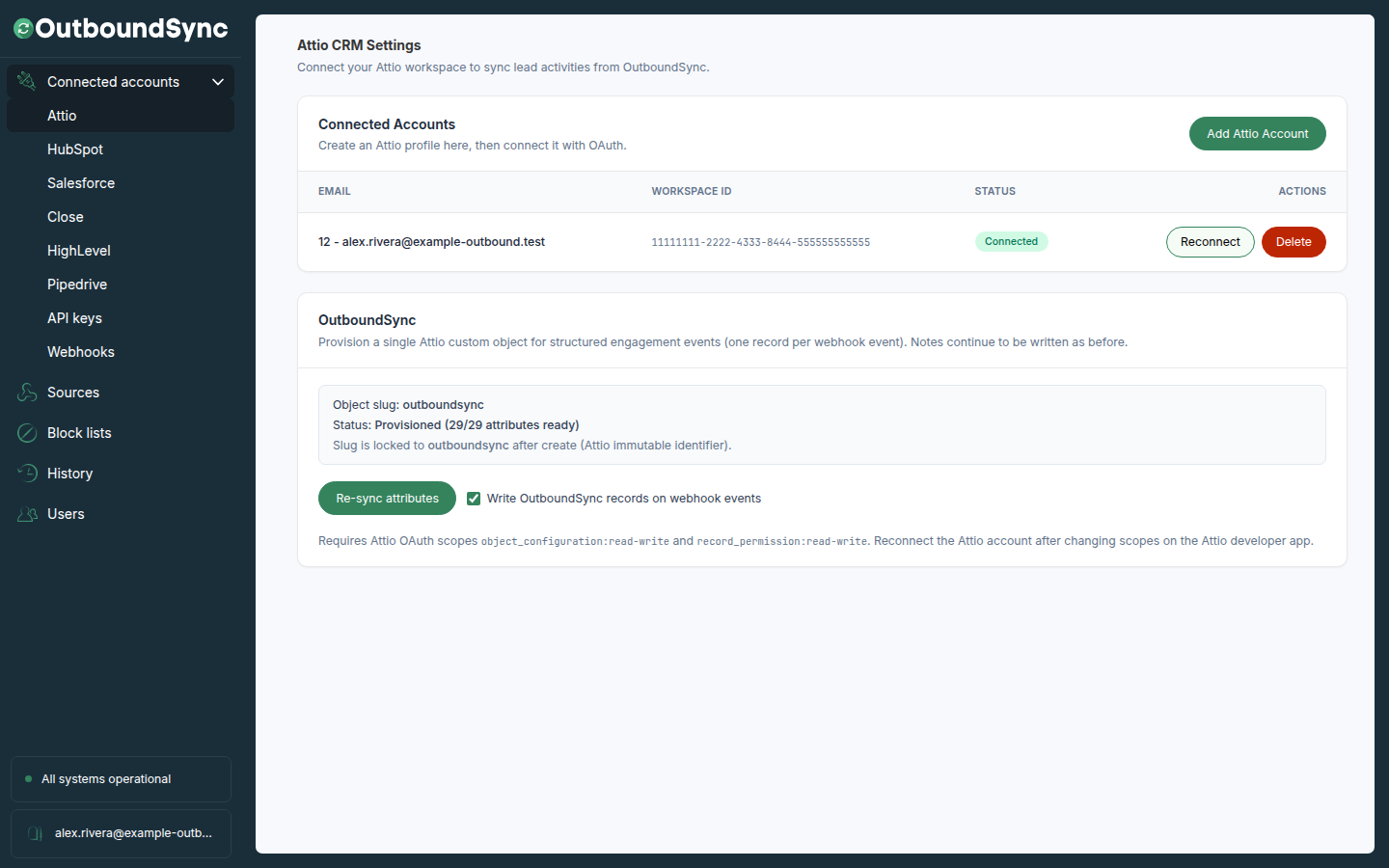
- Connect Attio as a Connected Account in OutboundSync. After the account is connected, you can provision the optional OutboundSync custom object on Attio CRM Settings.
- Create the Attio source and select your platform.
- Run a test sync and review activity on a real Attio record.
Optional OutboundSync custom object
Section titled “Optional OutboundSync custom object”The OutboundSync object is one locked Attio custom object named OutboundSync (slug outboundsync). When writes are on, OutboundSync adds one structured record per webhook event after the Person Note.
Each webhook event still creates a native Attio Note on the matched Person. Notes always write, even when custom-object permissions are missing or the write toggle is off. There is no per-webhook toggle; source settings point you to Attio CRM Settings for this optional object.
Person and company linkage on that record is stored as text IDs (person_record_id, company_record_id), not Attio record-reference fields. Writes are sparse: empty values are omitted. event_key is unique and is how OutboundSync upserts the same event without creating duplicates. All listed attributes are text, including occurred_at (ISO-8601 as text, not an Attio timestamp type).
Filterable attributes
Section titled “Filterable attributes”These are the attributes teams usually filter and view on. The provisioned object includes additional text fields for campaign IDs, profile URLs, bounce text, and similar event metadata.
| Label | Slug | Notes |
|---|---|---|
| OutboundSync Event Key | event_key |
Unique. Used as the matching attribute on upsert. |
| Event Type | event_type |
Normalized outbound event type. |
| Platform | platform |
Source sales engagement platform. |
| Occurred At | occurred_at |
Event timestamp as text. |
| Campaign Name | campaign_name |
Campaign name at time of event. |
| Campaign ID | campaign_id |
Campaign identifier from the source platform. |
| Sequence Number | sequence_number |
Sequence step number when available. |
| App URL | app_url |
URL back to the activity in the source platform. |
| From Email | from_email |
Sender email address. |
| From Name | from_name |
Sender display name. |
| To Email | to_email |
Recipient email address. |
| To Name | to_name |
Recipient display name. |
| Subject | subject |
Email subject when present. |
| Sent Message | sent_message |
Outbound message body when present. |
| Reply Message | reply_message |
Inbound reply body when present. |
| Attio Person Record ID | person_record_id |
Text ID of the matched Person. Not a record-reference. |
| Attio Company Record ID | company_record_id |
Text ID of the related Company when one was matched. Not a record-reference. |
Required OAuth scopes
Section titled “Required OAuth scopes”Custom-object provisioning and writes require both:
object_configuration:read-writerecord_permission:read-write
Configure these scopes on the Attio developer app, then reconnect the Attio account in OutboundSync. Missing these scopes does not block Notes or Person/Company sync.
Provision and enable
Section titled “Provision and enable”- Connect Attio, then open Attio CRM Settings.
- If the page reports missing custom-object permissions, add the scopes above and reconnect.
- In the OutboundSync section, choose Create custom object (or Re-sync attributes if the object already exists). The slug is locked to
outboundsync. A successful create or re-sync turns on Write OutboundSync records on webhook events. - Leave that toggle on, or turn it off to keep Notes only.
- Send a test event. Confirm the Note on the Person and, when the toggle is on, one OutboundSync record.
If something blocks writes
Section titled “If something blocks writes”- Custom-object permissions are missing. Add the two scopes, reconnect, then provision. Notes keep syncing.
- Archived in Attio. Unarchive the OutboundSync object in Attio, then re-sync attributes.
- Schema needs attention. Resolve the reported fields in Attio, then re-sync before enabling writes.
- Custom-object writes that skip because of missing scopes, a deleted object, or schema drift do not recreate the Note. The Note already written stays.
Existing setup guides
Section titled “Existing setup guides”Use the current webhook/setup guides below where they already exist:
