API (Beta)
OutboundSync API
Start with Try the API, create a key, then use OutboundSync API v1 for connections, sources, readiness, and webhooks.
When to use this guide: You want a programmatic way to verify an OutboundSync API key, inspect which CRM connections it can access, check whether your sync pipeline is ready, or help an AI coding assistant build against OutboundSync.
The OutboundSync API is the developer surface for OutboundSync itself. It is separate from the Smartlead, Instantly, EmailBison, HeyReach, and other external API keys you save so OutboundSync can read from those tools.
The API is in Beta. Introspection endpoints (/me, /account/status, /connections, /sources, /contacts/outreach) are stable and read-only. Mutations that require the write scope include sync retry, destination replay, blocklist pause/resync, and the Webhooks surface. We may add fields and endpoints as the surface grows.
Start here
Section titled “Start here”Pick the path that matches where you are:
Machine-readable contract (OpenAPI 3.1):
Base URL and authentication
Section titled “Base URL and authentication”Account endpoints live under /api/v1 and use Bearer authentication:
https://app.outboundsync.com/api/v1Authorization: Bearer osapi_<your-secret>Platform health endpoints (/health/live, /health/ready) and OpenAPI discovery do not require a key. See Platform health endpoints.
What you can call
Section titled “What you can call”The public API separates sources → destinations from webhooks: a source is an inbound URL you paste into a sequencer (UI: Sources), a destination is either a Forwarding destination URL or a Reply relay that CC’s a sales rep on prospect replies, and webhooks are OutboundSync-emitted Sync Monitoring events delivered to endpoints you register (UI: Webhooks).
| Endpoint | Auth | Purpose |
|---|---|---|
GET /health/live |
None | Is the platform process up? |
GET /health/ready |
None | Can it receive and sync events right now? |
GET /api/v1/openapi.json |
None | OpenAPI 3.1 document (JSON). |
GET /api/v1/openapi.yaml |
None | OpenAPI 3.1 document (YAML). |
GET /api/v1/me |
Bearer | Validate the key, list accessible CRM connections, discover related endpoints via links. |
GET /api/v1/account/status |
Bearer | Pipeline readiness with blockers[] and warnings[]. |
GET /api/v1/account/metrics |
Bearer | Request, sync, and destination-delivery counts for a from/to date range (max 31 days). |
GET /api/v1/connections |
Bearer | CRM connections with OAuth status and plan capabilities. |
GET /api/v1/sources |
Bearer | Inbound paste URLs, platform config, and destination bindings. |
GET /api/v1/contacts/outreach |
Bearer | Prior-outreach summary for a contact email and/or social profile URL. |
GET /api/v1/requests |
Bearer | Inbound receipts for a from/to date range (max 31 days). |
GET /api/v1/syncs |
Bearer | CRM sync attempts for a from/to date range (max 31 days). |
POST /api/v1/syncs/:id/retry |
Bearer (write) |
Enqueue a HubSpot/Salesforce Error sync retry. |
GET /api/v1/destinations |
Bearer | Forwarding destination catalog (list + get). |
GET /api/v1/destinations/:id/deliveries |
Bearer | Outbound delivery attempts for one forwarding destination. |
GET /api/v1/deliveries |
Bearer | Account-wide destination delivery export for a from/to date range. |
POST /api/v1/destinations/:id/deliveries/:deliveryId/replay |
Bearer (write) |
Enqueue a replay of one destination delivery. |
GET /api/v1/destinations/reply-relays |
Bearer | Reply relay catalog for accessible connections. |
GET /api/v1/blocklists |
Bearer | CRM→SEP blocklist syncs (named list). |
POST /api/v1/blocklists/:id/pause |
Bearer (write) |
Pause fetch and SEP push. |
POST /api/v1/blocklists/:id/resync |
Bearer (write) |
Queue a full CRM reload (not an incremental resume). |
/api/v1/webhooks |
Bearer | Register and manage Webhooks (Sync Monitoring). |
/api/v1/events |
Bearer | Queryable platform event log and delivery history. |
Full request and response shapes live in the API v1 reference. Use Try the API for health, account, blocklist, and webhook endpoints from the browser; fetch the OpenAPI URLs directly for discovery (they are not in the console menu). How-to for Sync Monitoring: OutboundSync webhooks.
Authentication flow
Section titled “Authentication flow”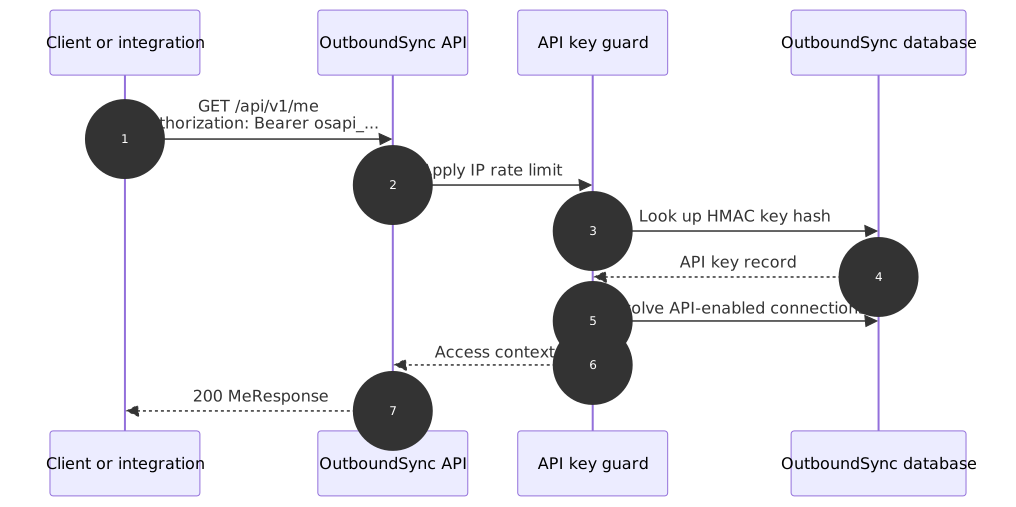
Quick test
Section titled “Quick test”Prefer the in-docs console when you can — Try the API needs no tooling. Use GET /api/v1/me as the first authenticated request. A successful response proves the key is valid and shows whether it is account-wide or scoped to one CRM connection.
curl 'https://app.outboundsync.com/api/v1/me' \
  -X GET \
  -H 'Authorization: Bearer osapi_<your-secret>'
Ask an AI coding assistant
Section titled “Ask an AI coding assistant”For how MCP, the API, Skills, and Sync Monitoring Webhooks fit one agentic loop, start at AI and Agents. Prefer connecting OutboundSync MCP when your harness supports Streamable HTTP — it wraps the same API v1 tools with your Bearer key. Without MCP, use the public Agent Skills over REST — start with Install skills instead of pasting a long rule:
npx skills add outboundsync/skills --skill api -gnpx skills add outboundsync/skills --skill preflight -gnpx skills add outboundsync/skills --skill sync-monitoring -gSee API, Preflight, and Sync monitoring.
For a quick key check only, paste this into Cursor, Claude Code, Codex, or another coding assistant after you create an API key:
Verify my OutboundSync API key against GET https://app.outboundsync.com/api/v1/me.Docs: https://outboundsync.com/docs/api/v1/OpenAPI: https://app.outboundsync.com/api/v1/openapi.jsonUse Bearer authentication. Parse the connections array and tell me which CRM connections this key can access.OutboundSync docs pages also have mirrored Markdown endpoints under /content/docs/...md/, so coding assistants can retrieve the same reference content in a machine-readable form.
