How webhook payloads are processed
When to use this guide: Use this guide when configuring or validating CRM integration behavior.
When OutboundSync syncs events to your HubSpot portal, it follows a specific logical flow. There are several factors that affect whether the data syncs, and if it does, which data syncs.
The purpose of this article is to provide a visual layout and explanation of the process.
If you want to better understand the default and custom properties in HubSpot, including a full breakdown by property label, name, and type, see here .
Requirements
Section titled “Requirements”Prior to an event occurring in your Sales Engagement Platform, the following need to be in-place:
- Your OutboundSync account is created and active.
- OutboundSync is installed in your CRM
- A source has been created and configured in OutboundSync.
- Webhook is enabled in your Sales Engagement Platform
With all that in-place, a webhook event occurs. Let’s walk through it.
Event-triggered workflow
Section titled “Event-triggered workflow”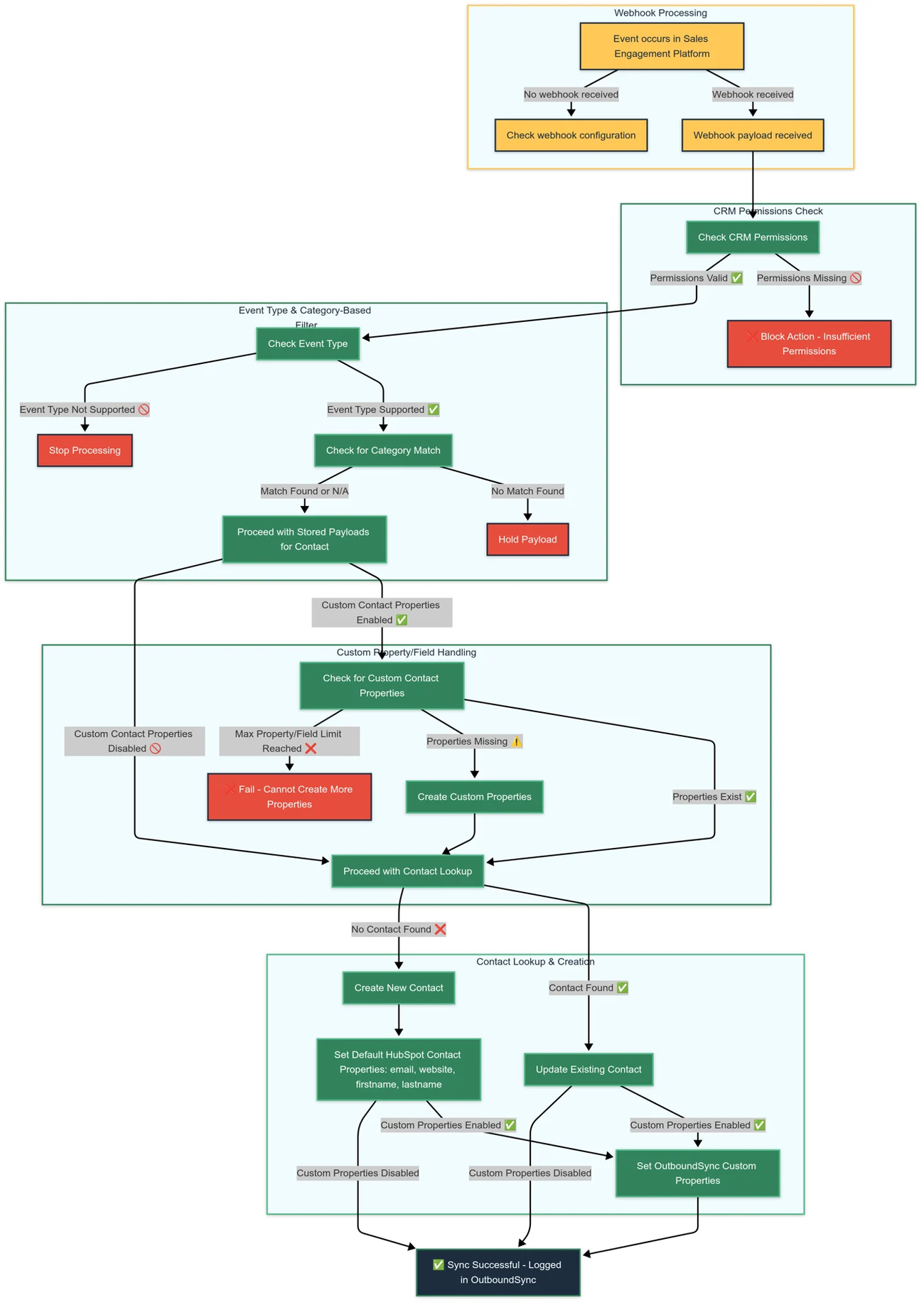
This workflow represents how OutboundSync processes inbound webhook events from Sales Engagement Platforms, validates data, and synchronizes it with HubSpot.
The diagram shows the standard create/update path. If the source has Contact handling: Update Only enabled, the contact lookup step changes: matched contacts are updated and receive activity, while unmatched contacts are skipped instead of created.
The process ensures that only relevant and properly categorized data is stored and updated while maintaining compliance with permissions, category filters, and contact property configurations.
Webhook Processing
Section titled “Webhook Processing”- Event Trigger: An event occurs in a connected Sales Engagement Platform (e.g., Smartlead, EmailBison, Instantly).
- Webhook Received: OutboundSync captures the webhook payload and logs it.
- Configuration Check: If no webhook is received, the system checks for misconfigurations.
CRM Permissions Check
Section titled “CRM Permissions Check”- Permissions Validation: Before proceeding, OutboundSync verifies whether it has valid permissions in the CRM.
- Access Denied: If permissions are missing, the action is blocked and logged in OutboundSync.
Event Type & Category-Based Filtering
Section titled “Event Type & Category-Based Filtering”- Check Event Type: Determines whether the event type is supported.
- If unsupported, the process stops immediately.
- Category-Based Filtering: If the event passes the event type check, it is evaluated against category filters.
- No Match Found → Hold Payload: If the event does not match a valid category, it is held for later processing.
- Match Found or N/A → Proceed with Stored Payloads: If a category match is found (or if filtering is not applicable), OutboundSync processes all stored payloads for the contact.
Custom Property/Field Handling
Section titled “Custom Property/Field Handling”- Check if Custom Properties are Enabled:
- If enabled, OutboundSync verifies whether custom properties exist in the CRM.
- If missing, OutboundSync creates them (unless the CRM has reached its maximum property limit, which fails the process).
- If disabled, the system proceeds to contact lookup.
Contact Lookup & Contact Handling
Section titled “Contact Lookup & Contact Handling”- Look Up Contact: OutboundSync checks if the contact already exists in HubSpot.
- If found → Update Contact: OutboundSync updates the matching contact and logs the supported activity.
- If not found and default create/update is enabled → Create New Contact: OutboundSync creates a new contact and logs the supported activity.
- If not found and Update Only is enabled → Skip Contact Creation: OutboundSync does not create a new HubSpot contact for that payload.
- Set Basic Contact Properties: OutboundSync sets core contact information (email, website, first name, last name).
- Apply OutboundSync Custom Properties: If custom properties are enabled, OutboundSync updates relevant fields with event metadata.
Sync Completion
Section titled “Sync Completion”- The sync process completes successfully, and all updates are logged in OutboundSync.
Key Takeaways
Section titled “Key Takeaways”- Ensures only permitted, categorized events are processed.
- Implements category-based filtering to manage relevant events.
- Handles CRM permissions and property/field creation dynamically.
- Supports Contact handling: Update Only for HubSpot teams that want activity only on matched contacts.
- Prevents sync failures by enforcing property limits.
- Logs all activity to provide full visibility into the sync process.