API (Beta)
Check prior outreach for a contact
Call GET /api/v1/contacts/outreach from an agent, low-code workflow, or enrichment column to skip contacts you already reached.
When to use this guide: Read this when a workflow — an agent, a low-code HTTP module, or an enrichment column — should skip or delay a contact you already reached.
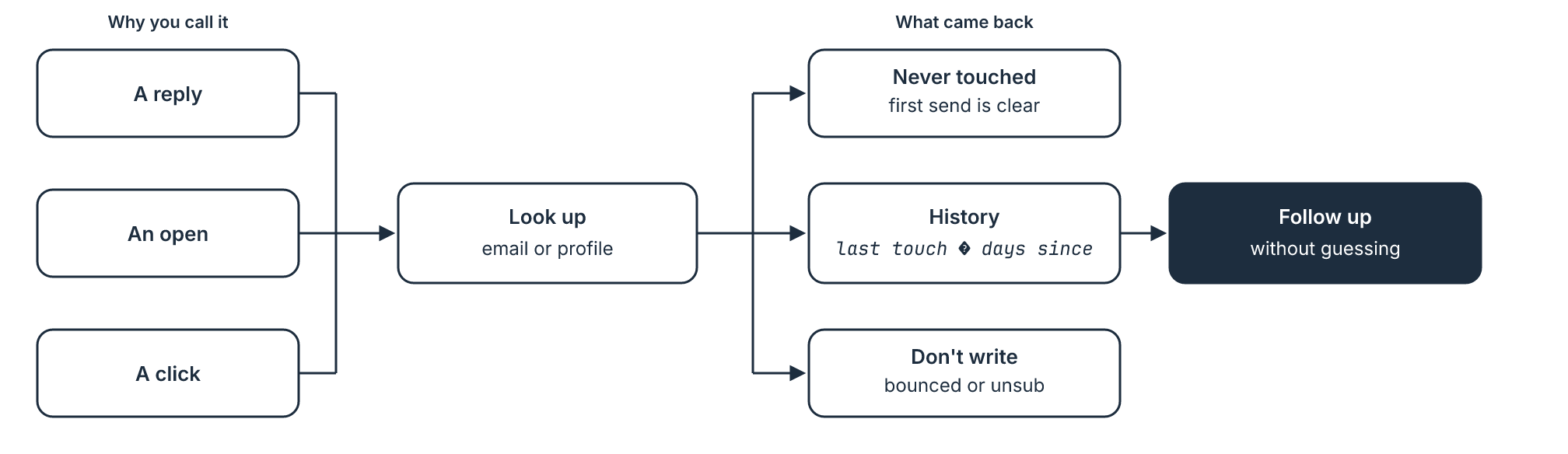
GET /api/v1/contacts/outreach is one authenticated GET. There are no tool-specific routes. Pass a contact email and/or social profileUrl; the response says whether that person was already emailed, called, or social-messaged, plus last-touch recency and hard Do-Not-Contact signals.
Here’s an example of how you could feed existing events into a workflow using a tool like Clay, Freckle, or Databar:
Sample use case
Section titled “Sample use case”Someone replies and you want to follow up without guessing what already went out, or don’t want to rely on just the partial event history. This is useful after multiple sends, when one converts, so your rep knows the full context.
The same idea after another trigger like a run of opens, a click, some other event. Say they never reply, but have multiple opens or clicks, your rep can be set up for success when they go to pick up the phone.
Any client that can send a Bearer GET works. ZoomInfo, Clay, Databar, and Freckle below are worked examples of the same call — jump to the one you use, or copy Shared request into an agent or HTTP module.
Prerequisites
Section titled “Prerequisites”- OutboundSync account with API access enabled on at least one CRM connection
- An API key from the OutboundSync dashboard (
osapi_…) — see Creating API keys - Sequencer webhooks flowing into OutboundSync (CRM sync optional — engagement lives in the OutboundSync event ledger)
Shared request
Section titled “Shared request”| Field | Value |
|---|---|
| Method | GET |
| URL | https://app.outboundsync.com/api/v1/contacts/outreach |
| Header | Authorization: Bearer osapi_<your_key> |
Query (at least one required):
email← contact emailprofileUrl← social profile URL (/in/…,/pub/…, or X). Repeat or comma-separate, max 5. All identities on one request are OR-unioned — send identities for the same contact only.
Useful JSON paths for filters: found, query.email / query.profileUrls, summary.everContacted, summary.everEmailed / summary.everSocialTouched, summary.lastTouchAt / summary.daysSinceLastTouch / summary.lastEventType / summary.lastPlatform, outcomes.replied / outcomes.bounced / outcomes.unsubscribed, doNotContact.value / doNotContact.reasons. Ignore blocklists.* in this release (evaluated is always false). Full shape: API v1 — contacts/outreach.
Optional readiness gate before a large run: GET /api/v1/account/status and skip when ready is false.
Recipe
Section titled “Recipe”- For each contact, pass
emailand socialprofileUrlwhen available - Keep contacts where
doNotContact.valueis false - Keep contacts where
foundis false, orsummary.daysSinceLastTouchis null, or it is ≥ your cadence (e.g. 90) - Hand the remaining contacts to AEs (call / high-touch sequence)
Rate limits
Section titled “Rate limits”- General API: 120 requests / 60 seconds per account
- Contact outreach: 600 requests / 60 seconds per account (separate bucket)
Respect Retry-After on HTTP 429. The outreach bucket does not send X-RateLimit-* headers, so pace fan-out on Retry-After alone. A rare 504 means the lookup ran past the 20-second query limit; retry shortly. See Errors and rate limits.
What this lookup does not do
Section titled “What this lookup does not do”- Identity match is case-insensitive on stored
to_email. HubSpot/Salesforce backfillto_emailwith the profile URL for social-only events; Attio, Close, HighLevel, and Pipedrive do not — passemailwhen you have it. doNotContactis bounce + unsubscribe only.blocklists.matchedis always false until evaluation ships — do not filter on it.firstTouchAt/lastTouchAtare processing time, not sequencer event time. Category-only matches setfound: truewithdaysSinceLastTouch: null.everContactedignores open/click-only and passive views/likes.
Contract notes live on the endpoint reference.
ZoomInfo
Section titled “ZoomInfo”GTM Studio Custom Data Connector.
| Field | Value |
|---|---|
| Name | OutboundSync — Prior Outreach |
| Base URL | https://app.outboundsync.com |
| Auth method | API Key |
| Key name | Authorization |
| Placement | Header |
| Key value | Bearer osapi_<your_key> |
Add an Enrich action: GET /api/v1/contacts/outreach with email and/or profileUrl. Use Test API, then generate output with test so workflow fields match ContactOutreachResponse. Optionally add a Retrieve action on GET /api/v1/account/status as the readiness gate.
Clay HTTP API enrichment column (Growth or higher). This is Clay as an API consumer. For syncing Clay’s native sequencer into your CRM, see the Clay engagement integration instead.
- Table → Add enrichment → HTTP API
- Prefer the Configure tab (or Generate and point Sculptor at
https://app.outboundsync.com/api/v1/openapi.json)
Map /Email and /LinkedIn URL (or your column names) onto email and profileUrl. Test one row, then run the table. Avoid unbounded parallel runs past 600 requests / 60 seconds.
Databar
Section titled “Databar”Databar custom API enrichment.
- Workspace home → Integrations → Connect a custom API
- Type Enrichment, method
GET, URL as in Shared request
Save, then add it from Enrich → Add or use your own REST API. Map columns → Add Columns → Run. On Databar Scale+, cap connector concurrency so you stay under 600 / 60s (for example ≤10 req/s sustained).
Freckle
Section titled “Freckle”Freckle HTTP API column (Build plan or higher). Freckle does not publish developer docs for this column — labels may drift; verify in the UI before a large run.
Create a column → HTTP API → endpoint and Authorization header as in Shared request. Map JSON paths, test on one row, then run the rest.
Before you run it at volume
Section titled “Before you run it at volume”Test the call against a contact you know you reached, then one you have not. Confirm found, doNotContact.value, and summary.daysSinceLastTouch. If the payload looks wrong, send the same query from Try the API so you can tell a mapping issue from an API issue.
Then apply the recipe: drop hard DNC, keep never-touched or aged-out contacts, and enroll the rest. Field-level contract notes stay on GET /api/v1/contacts/outreach. If you have been using a sequencer block list as a recency clock, the same filter belongs at enrollment — see Check prior outreach before you enroll.
