Last updated:
Attio custom objects for outbound activity
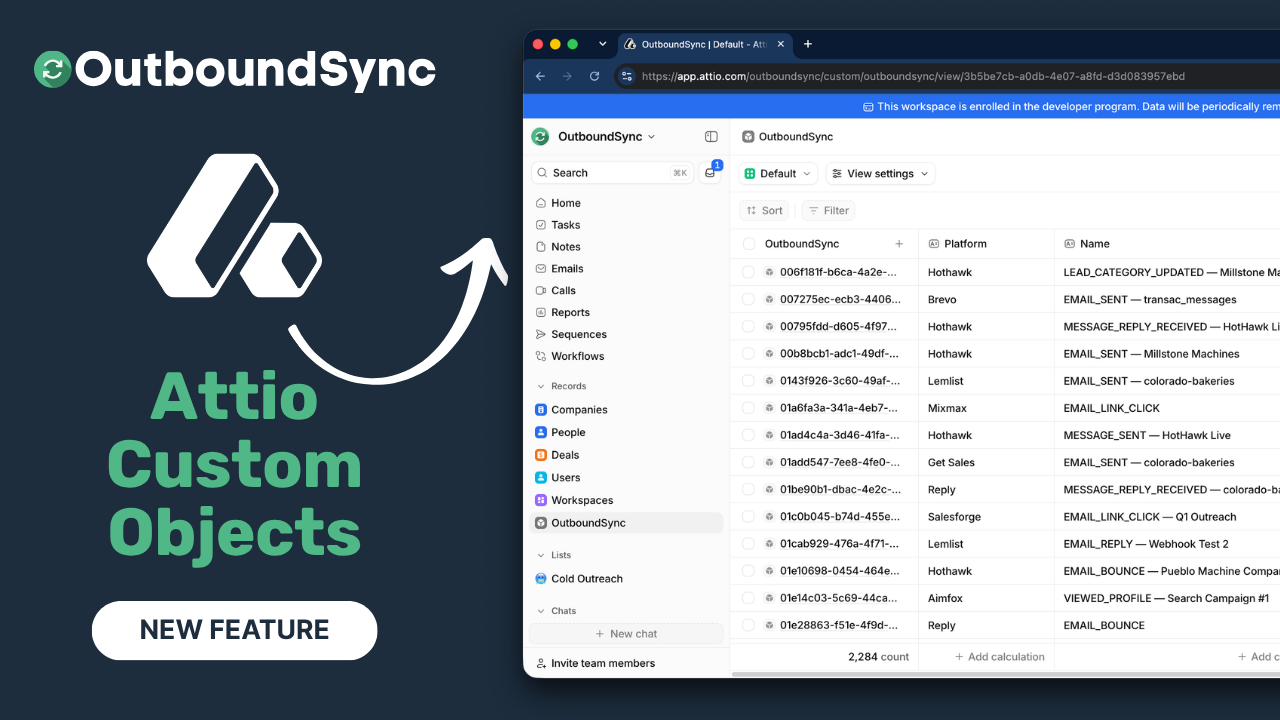
OutboundSync can now write outbound email and social events to a single Attio custom object — so you can filter activity, build views, and run workflows once that data lands in Attio, not only read it as Notes on a person.
We shipped the Attio integration earlier this summer with structured Notes for email and social events. Custom objects are what Attio is built around. With them, cold outbound becomes something you can query and automate inside the CRM you already work in.
Find OutboundSync in the Attio App Store, or start from the Attio integration page.
What you can do with Attio custom objects
Notes give you a timeline. The custom object makes Attio’s workflows and views useful for outbound.
Here’s a simple workflow you can build once positive replies land as OutboundSync records: when an outbound reply is positive, check whether the person has a phone number. If they do, create a call task. If they don’t, send an HTTP request to a data provider (for example gtm.ai, or any enricher you already use), pull a number through a waterfall if you need to, then create the call task — or fall back to a follow-up in the sequencer inbox tied to that send.
That path is an Attio workflow on your records. OutboundSync’s Attio beta still syncs email and social only; phone activity is not part of this rollout. The call task is something you create in Attio after the reply lands.
What’s on the OutboundSync object
We use one custom object for everything. You are not getting a separate object per event type or platform.
At the Attio connection in OutboundSync, you provision the object and its attributes once. It shows up in Attio’s left column alongside People, Companies, and the other default objects. Filterable fields cover the usual outbound shape: event type, platform, sequence number, to and from, contact details, subject, message body, and an app URL you can open to jump into the inbox provider.
How to enable Attio custom objects
- Connect Attio as a Connected Account in OutboundSync (Attio beta is one-way and onboarded with our team).
- Open Attio CRM Settings and create the OutboundSync custom object — or re-sync attributes if it already exists.
- Leave Write OutboundSync records on webhook events on so each event gets a structured record alongside the Note.
- Send a test event and confirm the Note on the Person plus one OutboundSync record.
Setup details, required OAuth scopes, and troubleshooting live in the Attio CRM beta guide — Optional OutboundSync custom object.
Example views you can build
OutboundSync does not ship prebuilt Attio lists or views. You build them on the object.
One useful view is every email reply from campaigns: message body, email address, and the app URL so a rep can open the thread in the sequencer and handle it there. Another is social replies with the same jump-out URL pattern.
We also have an upcoming feature called Reply Relay. It will let you handle email replies in your primary inbox and move those conversations over with a clean handoff. More on that soon.
Related Attio reading
- Attio CRM integration now available — the original beta launch and Notes model
- OutboundSync is now in the Attio App Store — OAuth install and platform coverage
- Partner spotlight: Attio — how Attio structures data and who it’s for
- 5050 Growth on Attio, outbound, and CRM sync — Nacho Lafuente on wiring cold outbound into Attio
Shout-out to the Attio team — they’ve been a joy to work with. We’ll keep shipping for Attio based on demand.
Watch the walkthrough
Transcript
0:00 Hey folks, this is Harris Kenny, founder of OutboundSync, and I am very excited to share some Attio news with you today.
0:07 We have officially released support for custom objects in Attio. And if you know anything about Attio, this is really what the platform is built on.
0:16 Custom objects. Now, we released our Attio integration earlier this summer, and we started with just basic notes for email and social events in cold outbound.
0:24 Now, with custom objects, I’m going to show you how you can build great views, great workflows, and do a lot more with your cold outbound once it lands inside of Attio.
0:35 So let me move myself out of the way and show you how it works. Now, I’m going to pull up just a sample workflow just right away.
0:43 This is the most interesting thing you can do with this, in my opinion. Here’s a really simple one. When you get an outbound reply.
0:48 And it’s positive. Run an Attio workflow to see if you have a phone number on the record or not.
0:56 If you do, you can create a call task. If you don’t, you can send an HTTP request out to a tool like gtm.ai or any other data provider.
1:06 Get a phone number. Maybe you run it through a waterfall or something like that. Get a phone number. And then if you do create a call task, if you don’t.
1:12 Create a follow-up via email or via whatever inbox is related to the sequencer. These kinds of things are really easy to build now thanks to custom objects.
1:24 Let me just zoom out and show you how it works really quick. When you go to connect your Attio account in OutboundSync, you’re going to define this at the account connection level.
1:32 And you will provision and create the attributes related to that custom object. At the account level, once you do that, you’re going to see the OutboundSync custom object show up in that left column, alongside the other primitive or default custom objects, or excuse me, default objects that come with
1:51 your Attio account. Now, all of the attributes that we’re providing that can be filterable across all of these different event types and platforms.
2:00 That’s going to be baked in for you. And you’re going to see tons of different sales engagement platforms and event types.
2:05 I can just show you a really quick preview of what’s included by default. Sequence number, to and from, contact information, subject line, message.
2:15 We’re doing this all with one single custom object, too. So we’re not going to take up a bunch of space in your account.
2:22 Now, you’ve got all this data, you can run workflows, and you can build custom views. Here’s an example of a view of every reply from email campaigns where you’ve got a message, you’ve got an email address, and then ultimately you’ve got this little app URL you can use to jump out to the inbox provider
2:38 if you want to go handle the reply over there. Another example would be social replies. Here’s a list of example social replies, and again, and then you can jump over to the app URL and handle the reply there.
2:53 We also have an upcoming feature called Reply Relay. I’m going to be sharing more about that soon. That’ll actually allow you to handle email replies in your primary inbox and then move those conversations over with a very smooth handoff.
3:04 So we’re thinking about how do we make it easy for you to run this scaled outbound and work with your existing tech stack.
3:11 Really excited to share this new feature with everyone. Attio users, Attio is one of our fastest growing integrations right now.
3:17 We’re going to be shipping a lot more for Attio based on demand. So keep an eye out for that. Really impressed by their AI native platform with a lot of extensibility.
3:25 And, uh, yeah, growth hackers love it. People love working with it and love building with it. And so we’re happy to build too.
3:31 Shout out to the Attio team. They’ve been a joy to work with. Really, really great process. Find OutboundSync in the Attio website.
3:37 Marketplace, in the Attio app marketplace. Or go to OutboundSync.com, book a demo, and I’d love to show you how it works.
3:43 Thanks so much, and we’ll see you in the next one. Bye.
Get started
- Install OutboundSync from the Attio App Store
- Book a demo for guided Attio onboarding
- Follow the Attio CRM beta guide to provision the custom object

Founder & President, OutboundSync
15+ years in B2B sales and operations. Former HubSpot Solutions Partner and Smartlead expert. Built the agency that became OutboundSync.
Similar posts
Reply Relay is now available
Reply Relay CCs a sales rep's Gmail or Outlook when a prospect replies on Smartlead or EmailBison, while campaign data still syncs to HubSpot and Salesforce.
Harris Kenny
OutboundSync Docs Built for Claude, Cursor & Codex
Harris walks through the OutboundSync docs: Command-K search, Markdown export, Ask Claude/Cursor, and agent-readable pages for Claude Code and Codex.
Harris Kenny
We've expanded OutboundSync Agent Skills
OutboundSync Agent Skills grew from 11 to 15 since the July launch. New: list building, API, Sync Monitoring, and omnichannel campaigns for your coding agent.
Harris Kenny