Integrations
Lookup method options for social sync
Configure Default, Alternative, or Optional Alternative contact lookup for HeyReach and Aimfox webhooks in OutboundSync (HubSpot and Salesforce).
When to use this guide: Use this guide when configuring HeyReach or Aimfox sources — choosing how OutboundSync matches social outreach activity to CRM contacts.
When syncing HeyReach or Aimfox activity into your CRM via OutboundSync, the Object Lookup Method determines how OutboundSync identifies and matches the correct contact or lead to write activity to.
Unlike email sequencing tools that always provide an email address, these social platforms send a social profile URL on each event (HeyReach includes it on every payload; Aimfox builds it from the prospect’s public identifier). OutboundSync therefore defaults to social profile URL as the unique identifier. You can configure other lookup methods when CRM enrichment is incomplete or you need a custom key.
The screenshots below show the OutboundSync webhook form. The Sales Engagement Platform selector will show whichever platform you chose (HeyReach or Aimfox); the Object Lookup Method options are the same for both.
Currently, there are three Object Lookup Method options:
Recommendation: Most teams should start with Default Property (Social Profile). Use Optional Alternative Property when HubSpot (or Salesforce) contacts often lack an enriched social profile URL but your SEP leads include email — OutboundSync can fall through to email. Use Alternative Property when you match on a single unique identifier (for example CRM record ID via os_objectlookup_id) and do not need URL or email fallbacks.
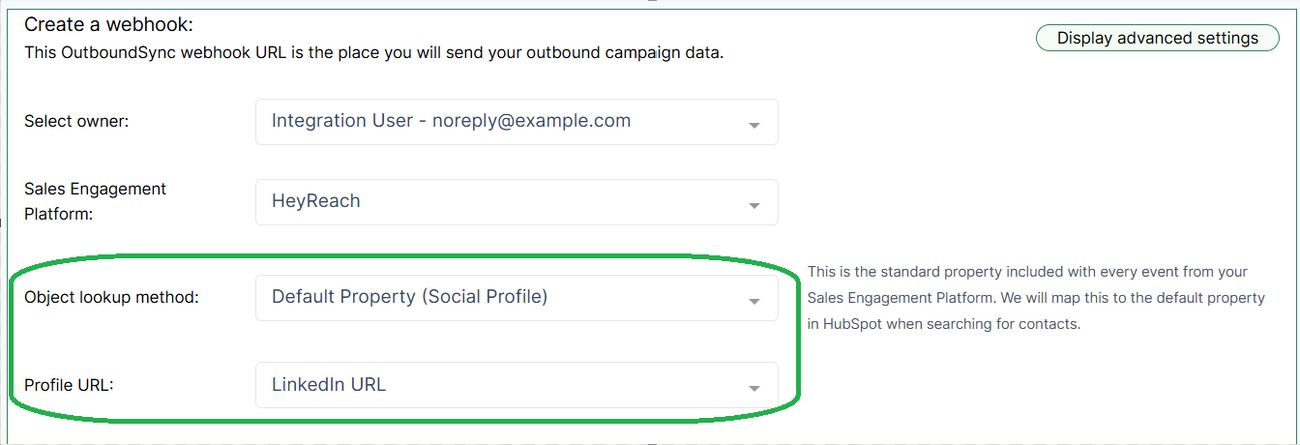
1. Default Property (Social Profile)
Section titled “1. Default Property (Social Profile)”- Uses the social profile URL from the webhook payload (
profile_url). - In the webhook setup, the Profile URL dropdown lets you choose which CRM field to map this to — either the standard LinkedIn URL field or a custom property.
- Upsert behavior: Updates the contact if a match is found, or creates a new contact if no match exists.
2. Alternative Property
Section titled “2. Alternative Property”- Uses the
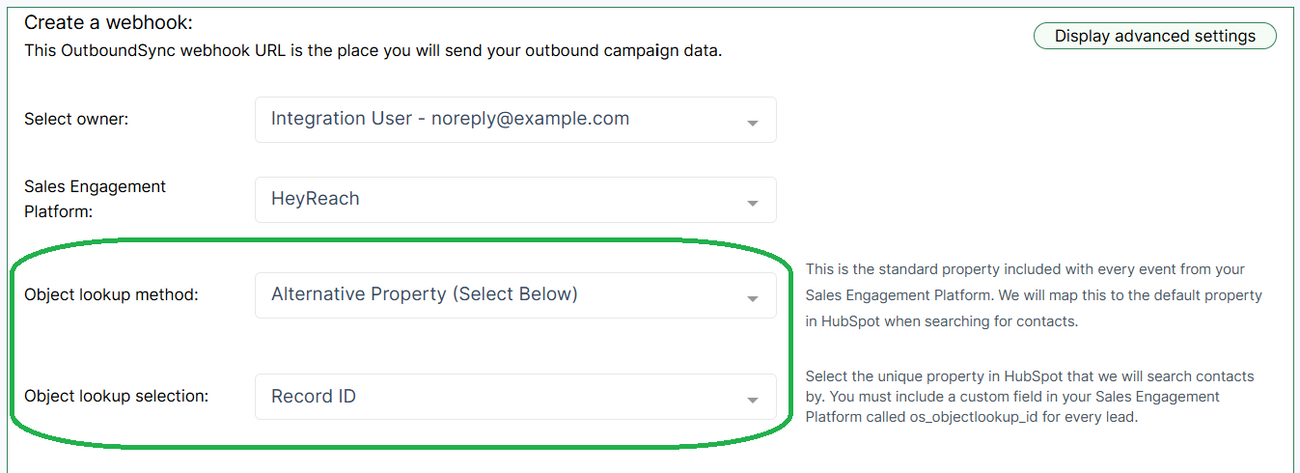
os_objectlookup_idvalue from the payload. To enable this for HeyReach, addos_objectlookup_idto your lead list so it is included in webhook payloads. Aimfox typically does not pass a customos_objectlookup_idon events — prefer HeyReach, Instantly, or EmailBison when you need this custom-ID workflow (see Using custom lead/contact object lookup ID). - In OutboundSync, the Object Lookup Selection field maps this identifier to the correct property or field in your CRM.
- This method lets your team match contacts on any unique identifier you maintain (for example CRM record ID, email, or another custom key).
- Update Only behavior: If a match is found, OutboundSync updates the existing record. If no match is found, a new contact will not be created.
3. Optional Alternative Property
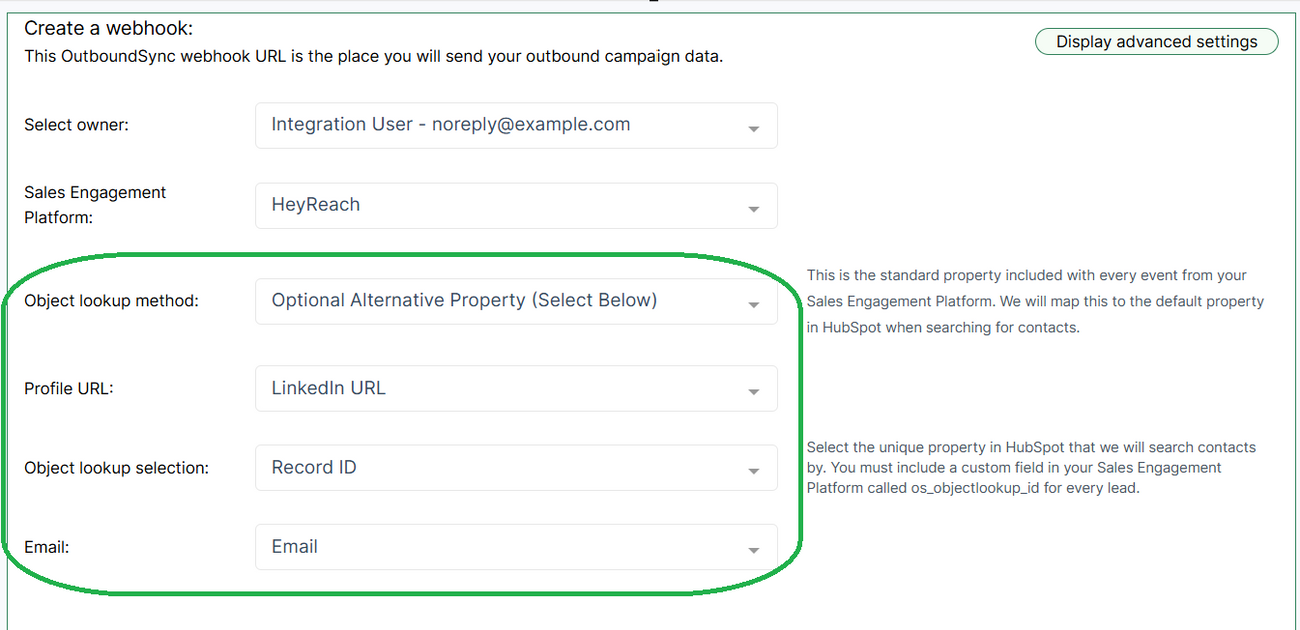
Section titled “3. Optional Alternative Property”Optional Alternative Property uses a triage lookup sequence. OutboundSync tries each configured identifier until one matches, then stops.
HubSpot (social platforms) — lookup order:
- Object Lookup Selection (
os_objectlookup_id) — only if the payload includes a non-empty value - Email — the Email property you mapped in the webhook setup (requires
to_emailon the payload) - Social profile URL — the Profile URL field you mapped
Salesforce (social platforms) — lookup order is os_objectlookup_id (if present) → social profile URL → email.
Form requirements: Saving Optional Alternative Property requires Object Lookup Selection, Profile URL, and Email mappings. Pick a CRM field for Object Lookup Selection (for example Record ID) even when your SEP does not send os_objectlookup_id — an empty payload value skips step 1 at runtime.
Aimfox note: Aimfox leads often omit email. Optional Alternative only helps when the Aimfox lead list includes email for the prospects you sync. Prefer Default Property when CRM contacts already have reliable social profile URLs.
- Upsert behavior: Updates an existing record when a match is found at any step; creates a new contact if none of the fields match.
Lookup Method Comparison
Section titled “Lookup Method Comparison”| Lookup Method | Identifier(s) Used | Webhook Fields to Configure | Behavior | Best For |
|---|---|---|---|---|
| Default Property (Social Profile) | Social profile URL (profile_url) |
Profile URL → standard LinkedIn field or custom property | Upsert: update if matched; create if not | General use when CRM contacts have social profile URLs |
| Alternative Property | os_objectlookup_id (lead-list custom field) |
Object Lookup Selection → CRM field holding your identifier | Update Only: update if matched; no new contact created | Teams matching on a custom unique key (HeyReach / Instantly / EmailBison) |
| Optional Alternative Property (Triage) | HubSpot: os_objectlookup_id → email → social profile URL |
Object Lookup Selection, Profile URL, Email | Upsert with sequence: update if matched at any step; create if none match | CRM social URLs incomplete but SEP leads include email (common Aimfox HubSpot setup) |
When a lookup matches more than one HubSpot contact
Section titled “When a lookup matches more than one HubSpot contact”This applies when Default Property or Optional Alternative Property falls through to social profile URL (or email) matching and HubSpot returns more than one contact for that value.
OutboundSync selects one record and writes activity to it. The tie-breaker is the contact with the most recent create date (createdate, descending). Older records are not updated.
What this means in practice: activity may land on a different contact than you intended when multiple records share the same social profile URL or email.
To avoid relying on the tie-breaker, pass a unique identifier in every payload when your SEP supports it — see Using custom lead/contact object lookup ID.
