Getting Started
Setting up reply relays
On a prospect reply in Smartlead or EmailBison, OutboundSync replies from the sequencer mailbox and CCs a sales-rep address so the rep can pick up the thread.
When to use this guide: Use this guide when you want OutboundSync to loop a sales rep into a prospect reply automatically — without the rep sending the first follow-up manually from the SEP.
A reply relay is a Destinations capability for Smartlead and EmailBison. When a prospect replies, OutboundSync sends a reply from the sequencer mailbox and CCs one sales-rep address so the rep can pick up the thread.
This is different from:
- Forwarding destinations — URL forwarding to Clay, Zapier, Make, or a custom endpoint
- Manual SEP reply + CC — a rep sends from the SEP inbox and CCs the rep’s primary address (see Where to reply)

Prerequisites
Section titled “Prerequisites”- Destinations enabled on the CRM connection. If Destinations is off, the catalog and source bind UI tell you to enable it — contact OutboundSync or your onboarding contact; it is not a self-serve toggle on the source.
- A Smartlead or EmailBison source for that connection. Instantly and other platforms are not supported for reply relays.
- A valid SEP API key on that source (EmailBison also needs its base URL). Binding a relay without an API key is blocked.
Create a reply relay
Section titled “Create a reply relay”- In OutboundSync, open Connected accounts → Reply relays.
- Choose a connection that has Destinations enabled.
- Click Add Reply relay and fill in:
| Field | Required | Notes |
|---|---|---|
| Description | Yes | Catalog and bind label (for example, AE reply relay — ACME) |
| CC email | Yes | The mailbox that receives the transferred conversation |
| Body variations | No | Up to 5 short variants; blank is fine (CC-only). One variant is chosen at send time. Presets cover looping in a colleague or transferring to another inbox. |
| Send delay | Yes | ASAP, or 1 minute through 4 hours (default 1 minute) |
| API key for categories | No | Loads Smartlead/EmailBison category or tag options only. Not stored on the relay — Reply-CC uses the source’s API key at send time. Required in the UI before you can pick categories/tags. |
| Apply to lead categories / tags | No | Empty = all replies. When set, after the send delay Reply-CC checks the lead’s current Smartlead category or EmailBison tags and continues only on a match. |
- Click Create.
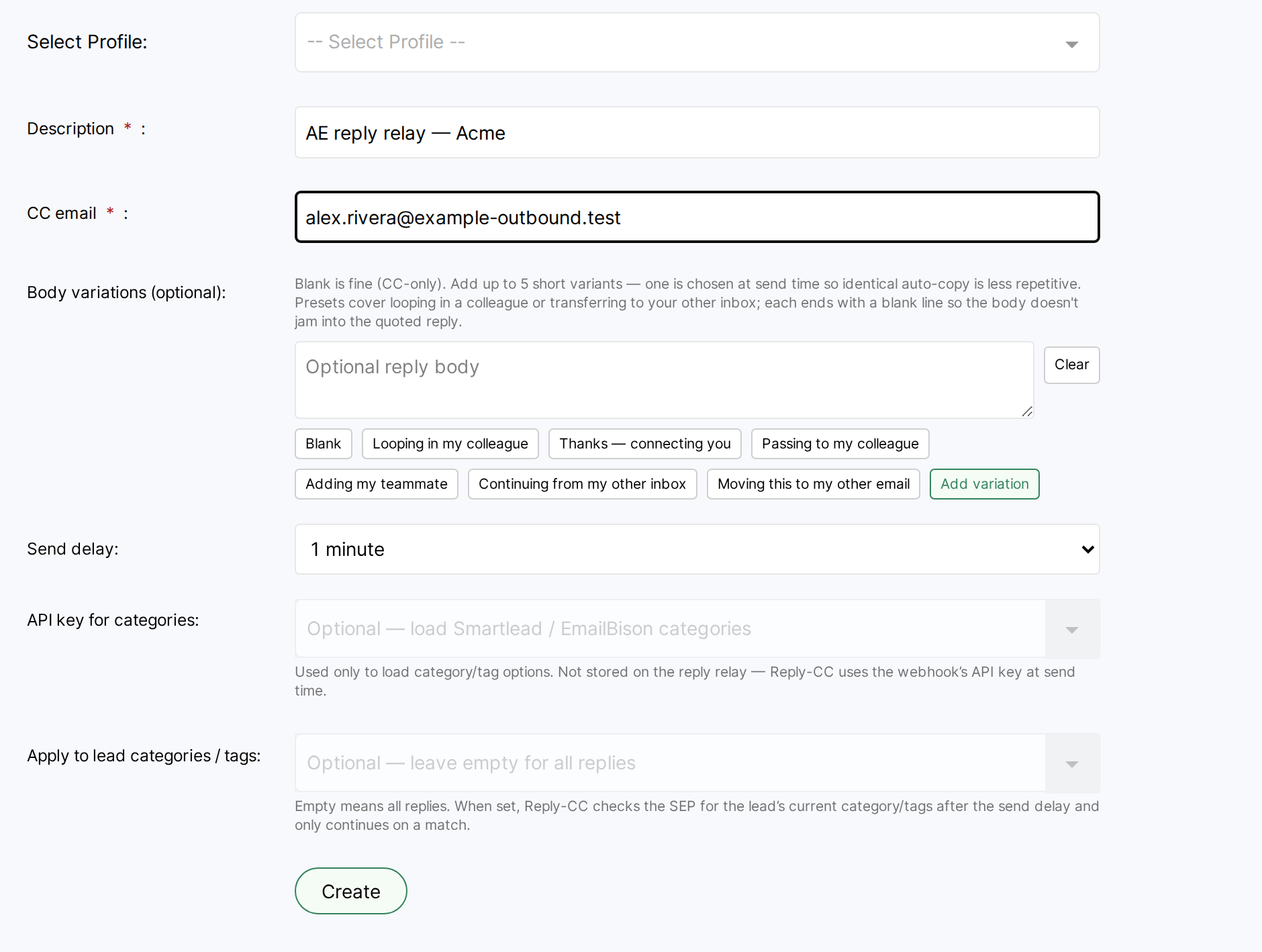
You can delete a relay that is not bound to a source. There is no edit form in the catalog — create a new relay if you need different settings (including a different category/tag allowlist), then rebind it on the source.
Optional category / tag allowlist
Section titled “Optional category / tag allowlist”Leave Apply to lead categories / tags empty to hand off on every eligible prospect reply (still subject to the once-per-campaign handoff below).
When you select categories or tags:
- Smartlead uses lead categories; EmailBison uses tags (same catalog field).
- After the send delay, OutboundSync looks up the lead’s current category/tags with the source’s API key and continues only on a match.
- The catalog Categories column shows the selected names, or All when the allowlist is empty.

There is no edit form — to change the allowlist, create a new catalog row and rebind it.
Bind the relay on a source
Section titled “Bind the relay on a source”- Open the Smartlead or EmailBison source settings.
- Under Reply relay (optional), choose the catalog row (
description (ccEmail)), or None to leave it unbound. - Confirm the source has an API key stored under External API keys. If a relay is selected without a key, OutboundSync shows: Reply relay needs a Smartlead/EmailBison API key on this webhook.
- Save the source.
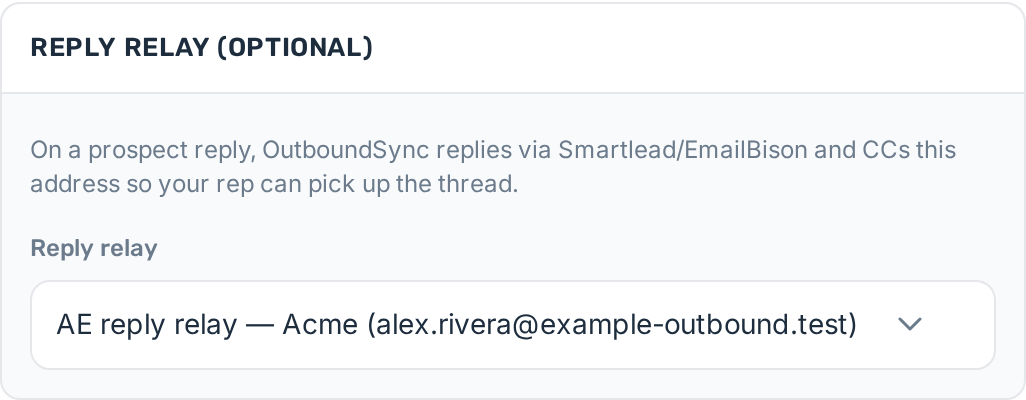
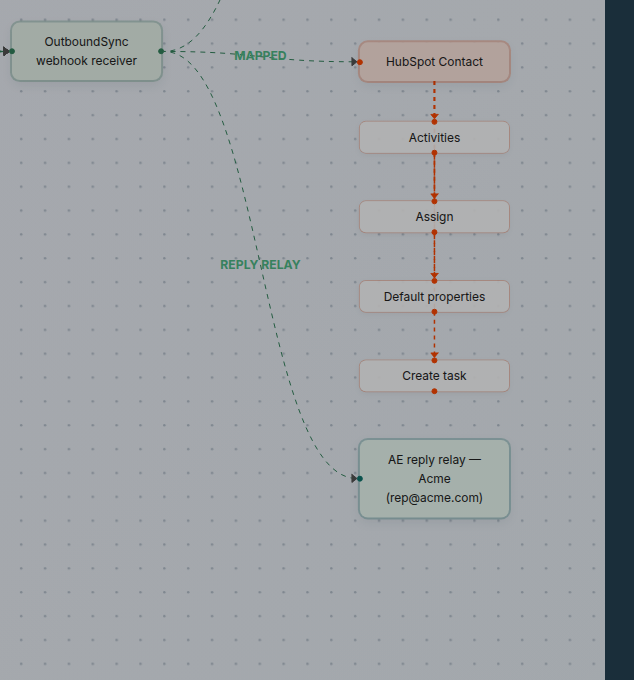
One reply relay can be bound per source.
What happens on a prospect reply
Section titled “What happens on a prospect reply”- The SEP delivers the prospect reply to your OutboundSync source URL.
- OutboundSync syncs the reply to your CRM immediately.
- After the catalog send delay, if the relay has a non-empty category/tag allowlist, OutboundSync looks up the lead’s current Smartlead category or EmailBison tags via the source API key. No match (or a failed lookup) skips the handoff — status
skipped, notfailed. - When the allowlist check passes (or the allowlist is empty), OutboundSync calls the SEP reply API:
- From the sequencer mailbox on the reply event (never the connection-owner email)
- CC the address on the bound reply relay
- With an optional short body (or blank for CC-only)
- The SEP may echo that outbound reply into CRM as a sent email with the CC preserved. That echo does not fire another reply relay.
What happens on a second reply
Section titled “What happens on a second reply”A reply relay is a one-time handoff per source + campaign + prospect. The first prospect reply in a campaign can trigger the sequencer reply + CC. Later replies from that same prospect in that same campaign on the same source do not send another automated “passing this to my colleague” message. The same prospect in a different campaign can still get a separate handoff.
Those later same-campaign replies still sync to your CRM immediately, so reps and workflows keep seeing activity there (and often via email threading if the prospect uses Reply-All on the CC’d thread). In History → Reply relay logs, the handoff skip is recorded as skipped — not failed. That means the relay already used its handoff for that campaign; it is expected product behavior, not an outage.
Optional automation for “another reply arrived after handoff” (for example a platform webhook event) is not part of this guide and may ship later.
Troubleshooting
Section titled “Troubleshooting”Use History → Reply relay logs to inspect recent sends (last 30 days). Filter by webhook, status (success / failed / skipped), platform, or reply relay, and open a row for the raw log payload. The Categories column prefers live lead category/tag names recorded at send time; otherwise it shows Allowlist: … or All.

skipped, with the reason in Error).Common reasons a relay does not send:
- Destinations is not enabled on the connection
- No reply relay is bound on the source
- Missing or invalid SEP API key (or EmailBison base URL)
- CC address matches the sequencer From or the prospect (self-CC / prospect-CC skips)
- Category/tag allowlist miss — status
skipped; the Error column shows the reason; the opened log JSON haserror.codecategory_allowlist_miss - Category/tag lookup failed (missing lead id, EmailBison base URL, or SEP error) — status
skipped;error.codecategory_lookup_failed - Per-campaign handoff already used (at most 1 reply-relay attempt per source + campaign + prospect) — status
skipped, notfailed. The handoff counter increments when the job is enqueued, so an allowlist miss or lookup skip still counts as the handoff for that campaign and prospect on that source.
Next step
Section titled “Next step”- HubSpot: Where to reply after the loop-in
- Salesforce: Where to reply after the loop-in
