Last updated:
Pipedrive integration walkthrough
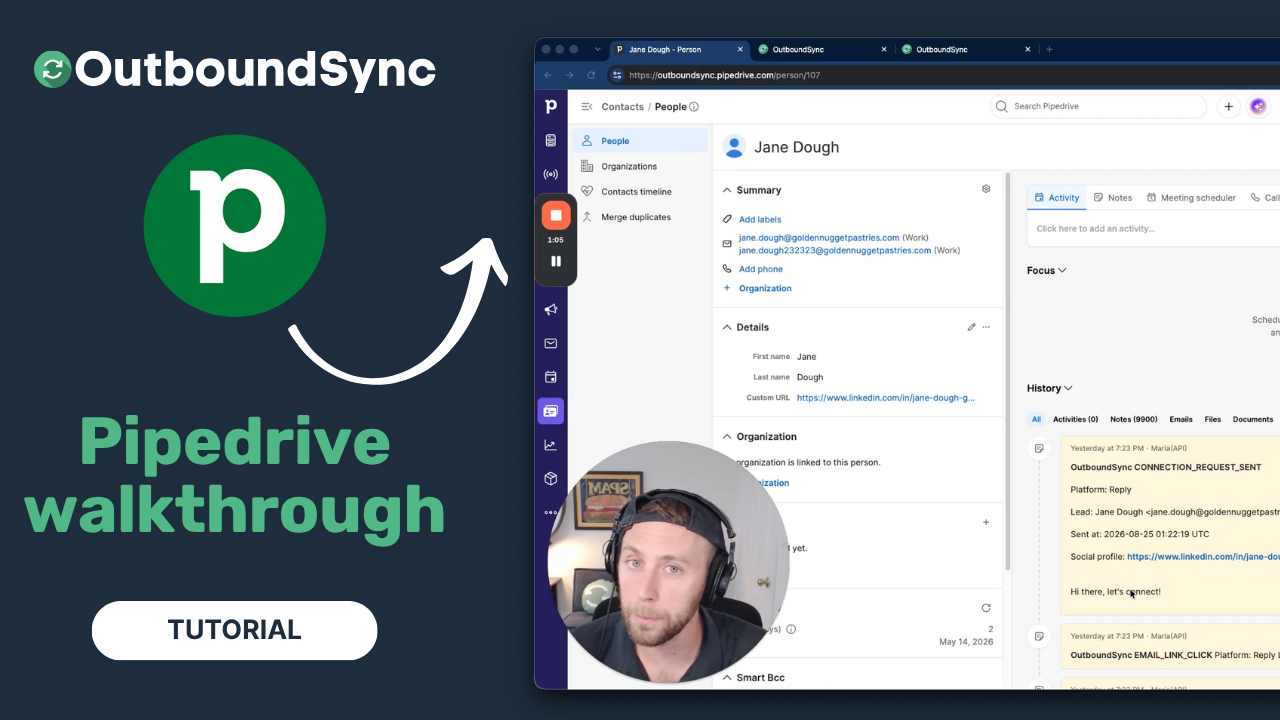
Pipedrive is now a supported CRM destination in OutboundSync. In this walkthrough I install our Pipedrive Marketplace app, connect an account, and configure what syncs — so outbound activity from your sending tools lands on the right Person automatically.
If your reps run their day in Pipedrive, this is how their outbound work shows up where they already are, instead of sitting in a separate tool.
Prefer reading to watching? Jump to the full transcript.
What you’ll see in Pipedrive
When OutboundSync runs, it finds the Person in Pipedrive and logs each outbound activity as a Note on that Person’s timeline. Sends, replies, opens, clicks, connection accepts, and call logs land on the record your reps already open before a call, so nobody has to log outbound activity by hand.
The beta writes the Person and the Note. For the full mechanics of what the beta covers, see the launch announcement.
Install OutboundSync from the Pipedrive Marketplace
Connecting takes one trip to the Pipedrive Marketplace. Search “OutboundSync,” click install, and authorize the app. OutboundSync is an official Marketplace app, so the connection runs through Pipedrive’s standard OAuth — no API keys to paste, no workarounds.
Find OutboundSync in the Pipedrive Marketplace →
Configure your data sync
Once Pipedrive is connected, you point OutboundSync at the sales engagement platform you already run — Smartlead, Instantly, HeyReach, and 20-plus others. Then you decide how much to sync: every event, or positive replies only. You can also forward the same data to additional destinations if another system needs it.
Check the Pipedrive integration page for the current list of supported platforms, and the Pipedrive CRM beta guide for setup details.
After the sync: replies, attribution, growth
Getting the data into Pipedrive is where the real work begins. Once outbound activity is on the Person, you can route replies to the right rep, attribute revenue back to the campaigns that earned it, and build workflows on top of clean activity data.
Why we built the Pipedrive integration
Pipedrive was one of the most requested CRMs from our top agencies, especially in Europe. It is in beta and one-way today, and we are shaping it with customer feedback. If you are running outbound into Pipedrive, tell us what you need next.
Transcript
[00:00:00] Harris Kenny: Hey there, my name is Harris Kenny. I’m the founder of OutboundSync, and today I want to show you our brand new Pipedrive integration.
[00:00:07] Pipedrive is a very popular CRM, and you might be using it and want to get data from your outbound campaigns with tools like Smartlead or Instantly, or the 20-plus options we support. If you want that outbound data in Pipedrive, we’ve built a great way to do it. Let me get out of the way and show you how it works.
[00:00:29] When OutboundSync is running, we look up those people in Pipedrive and log the activities as Notes. You might be wondering how it works — it’s pretty easy. You just connect your Pipedrive account, and I’ll show you.
[00:00:42] We’ll go to the Pipedrive Marketplace, and you’ll see how quickly you can find us. Type in “OutboundSync,” and here we go. I’ve already got it installed, so it says Manage app, but you can click Install and add it to your Pipedrive account, no problem.
[00:01:00] Once you’ve done that, you’ve connected through that OAuth process — because we’re in their Marketplace and we’re an official app, thanks to the Pipedrive team.
[00:01:09] Then you just configure it. This is showing Smartlead. Like I mentioned, we also work with Instantly and 20-plus sales engagement platforms. You configure the data sync: sync everything, or positives only. And you can forward that data on to additional destinations.
[00:01:23] Once you’ve got it in there, the work continues — handle the replies, attribute revenue, grow your business.
[00:01:34] I’m really excited to support Pipedrive. This was a popular request from some of our top agencies, especially in Europe. Looking forward to serving Pipedrive users, building this integration with your feedback, and seeing how we can make it better. Thanks for checking it out, and I’ll see you in the next one.
Get started
Want this on your Pipedrive data? Book a demo, read the Pipedrive integration page, or follow the Pipedrive CRM beta guide.

Founder & President, OutboundSync
15+ years in B2B sales and operations. Former HubSpot Solutions Partner and Smartlead expert. Built the agency that became OutboundSync.
Similar posts
Running outbound with Supabase monitoring your TAM
Companies keep customers in the CRM and the rest of the TAM in a database. How OutboundSync forwarding, API, webhooks, and MCP sit next to Supabase.
Harris Kenny
Build vs buy: getting outbound data into your CRM
Should you build your outbound-to-CRM sync with Zapier, Make, or n8n, or buy it? Use OutboundSync's three calculators to run the build-vs-buy math.
Harris Kenny

Using OutboundSync public health endpoints
OutboundSync public health endpoints: live vs ready, no API key. Watch the walkthrough and follow the Make tutorial to monitor outbound CRM sync.
Harris Kenny