Last updated:
OutboundSync webhooks are live
TL;DR. OutboundSync now sends you a webhook when your CRM sync starts failing — and again when it recovers. Point it at any HTTPS URL (Slack, PagerDuty, n8n, Zapier, Clay), copy the signing secret once, and stop polling our API to find out something broke. Read the webhooks docs to set one up. It is in beta — if it is not on your account yet, request access.
Your outbound tools send the messages; OutboundSync makes sure your CRM knows what happened. But every GTM team eventually hits the same question: what happens when that sync itself breaks? Until now, the answer was to notice — a rep flags a stale record, or someone opens the dashboard on a hunch. Webhooks close that gap.
What it does
Register an HTTPS endpoint and OutboundSync will POST a Sync Monitoring event to it when your sync health changes. Two events are live today:
| Event | Fires when |
|---|---|
sync.failed | A source→CRM sync goes from healthy to failing after three consecutive failed syncs for that source and connection — one alert per incident, not one per failed job |
sync.recovered | A previously failing sync starts succeeding again |
Send those alerts wherever your team already works: a Slack channel, PagerDuty, or an automation platform like n8n, Zapier, or Clay. No polling, no cron job hitting our API on a timer — the notification comes to you.
Every sync.failed payload pairs a reason (what went wrong) with a remediation (the exact fix, often a dashboard link), so the alert is actionable on arrival rather than a nudge to go investigate.
How it works
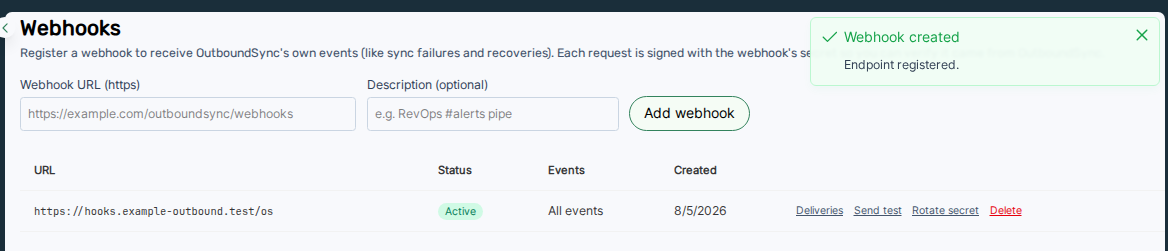
You register webhooks under Platform access → Webhooks in the app. Add an HTTPS URL, pick which events you want (or leave it empty for all active events), and copy the signing secret the moment it appears — it is shown once.
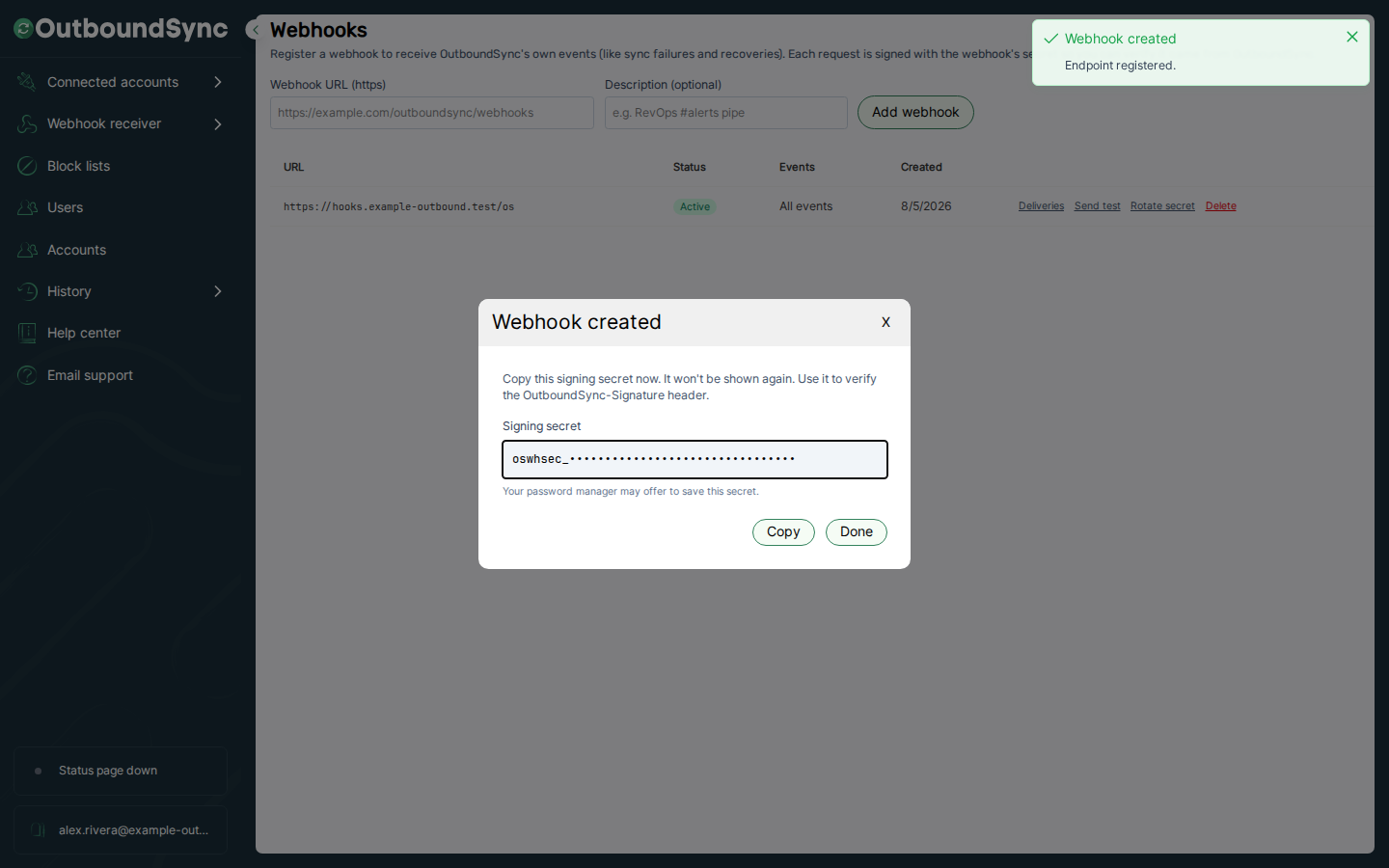
That signing secret is how you trust the alert. Every delivery carries an OutboundSync-Signature header — an HMAC-SHA256 over the timestamp and the raw request body — so your endpoint can confirm the event really came from us before it pages anyone. The payloads and signatures guide has drop-in verification code.
Once an endpoint is live, you are not flying blind on the webhook itself:
- Send a test ping to confirm the endpoint is wired up before you rely on it.
- Replay any delivery from the log after you fix a handler.
- Reconcile from the events log —
GET /api/v1/eventskeeps every event queryable even if no endpoint was active when it fired, so nothing is lost while a URL is down.
Deliveries are at-least-once with retries over roughly two hours; the delivery and retries doc covers the exact schedule, dedup, and auto-disable behavior.
Set it up yourself — or have your agent do it
You can register sync monitoring webhooks by hand in the app. You can also let an agent do it: the same public API and MCP server that expose the rest of OutboundSync can create, test, and verify a webhook for you.
Install the Sync monitoring Agent Skill, connect the MCP server, and your coding agent can stand up the whole loop — register the endpoint, send a test.ping, confirm the delivery succeeded — reading from /webhooks and /events and only writing after you confirm. The AI and Agents hub shows how webhooks, the API, and Skills fit together.
Why we shipped it
This kind of observability is still rare in the sales engagement space. When the CRM is your source of truth for outbound, the pipe that fills it should tell you the moment it clogs — not next week, when the numbers look off.
That is a commitment to being transparent about getting your data into your systems of record, for everyone who depends on it: your reps, your ops team, and increasingly your agents.
Try it today
Webhooks are in beta and enabled per account. If it is already on yours, you can register your first endpoint right now under Platform access → Webhooks. If not, request access and we will turn it on.
- Webhooks overview — what they are and how they differ from inbound Sources
- Setting up webhooks — dashboard and API steps, URL rules, and limits
- Event types — what fires today and what is reserved
- Payloads and signatures — the envelope and verification code
- Testing and troubleshooting — test pings, replays, and common 403s
And if you have not tried them yet, the API and MCP server are in public beta. They do a lot more than webhooks — including helping you (or your agent) set these up.
Frequently asked questions
What are OutboundSync webhooks?
OutboundSync webhooks are Sync Monitoring alerts. You register an HTTPS URL, and OutboundSync POSTs an event to it when your outbound→CRM sync breaks (sync.failed) or comes back (sync.recovered). It is a push channel for sync health, so you do not have to poll the API to find out something went wrong.
Which webhook events fire today?
Two. sync.failed fires when a source→CRM sync goes from healthy to failing after three consecutive failed syncs for that source and connection — one alert per incident, not per failed job. sync.recovered fires when that same sync starts succeeding again. A test.ping is delivered on demand when you test an endpoint.
How do I set up an OutboundSync webhook?
Two ways. In the app, open Platform access → Webhooks, add an HTTPS URL, and copy the signing secret when it appears — it is shown once. Or use the API and MCP server so a coding agent can register and verify the webhook for you. Full steps are in the setup docs.
How do I verify a webhook is really from OutboundSync?
Every delivery carries an OutboundSync-Signature header — an HMAC-SHA256 over the timestamp and raw request body using your signing secret. Verify against the raw body bytes with a constant-time compare and reject stale timestamps. Sample code is in the payloads and signatures docs.
Do I need special access to use webhooks?
Webhooks are in beta and enabled per account. If it is not on yet, request access and we will turn it on. Managing webhooks over the API also needs an account-scoped key with the write scope for create, update, test, and replay — see Creating API keys.

Founder & President, OutboundSync
15+ years in B2B sales and operations. Former HubSpot Solutions Partner and Smartlead expert. Built the agency that became OutboundSync.
Similar posts
OutboundSync now supports WebMCP
AI agents can now use the OutboundSync website directly — find integrations, get pricing, and compare tools — via WebMCP and a public JSON API.
Harris Kenny

OutboundSync MCP Server out now
Hosted OutboundSync MCP for Cursor, Claude Code, and more. Same Bearer key as the REST API, with no local MCP process to run.
Harris Kenny

New integration: Furnace
Sync Furnace cold email sends, replies, reply categories, and bounces into HubSpot and Salesforce with OutboundSync as structured CRM activity.
Harris Kenny