Last updated:
The OutboundSync API is now in public beta
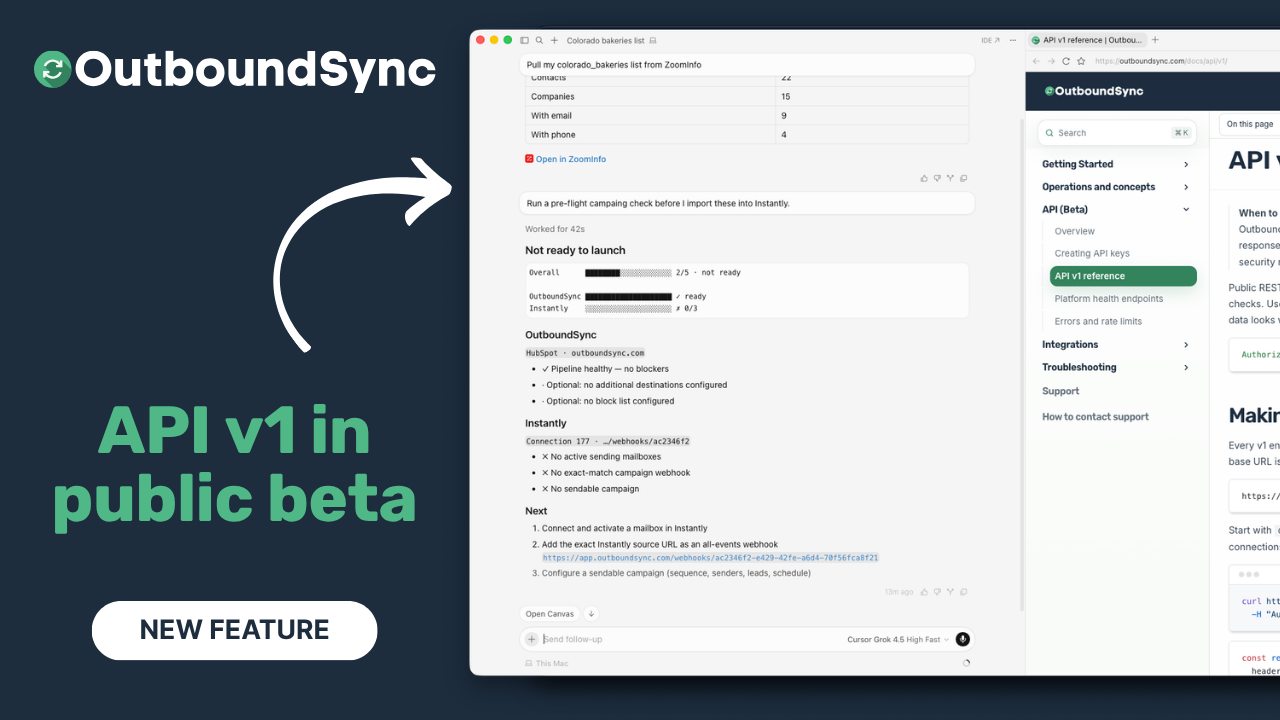
TL;DR. The OutboundSync API is in public beta. Use the read-only introspection endpoints to validate your key, see which CRMs are connected, and confirm the pipeline is ready before a campaign goes out — and use Sync Monitoring Webhooks when you want OutboundSync to notify your HTTPS endpoint on sync.failed / sync.recovered. Watch the two-minute walkthrough below, then read the API overview.
How teams build and ship outbound campaigns has changed over the last several months. More of that work now happens in agentic coding environments like Cursor, where a prospect list, a sending platform, and your CRM can all be reached from one place. Our customers asked us to support that way of working, so we did.
The API gives those workflows a direct question to ask OutboundSync: is my account ready to sync this campaign into HubSpot or Salesforce, or is something going to break first?
What’s in the beta
The beta ships two tiers of endpoints.
Public platform health. Two endpoints report whether the OutboundSync platform is up and able to process events. They are unauthenticated — no key, no cookies — so you can point an uptime monitor straight at them. They live at the host root, https://app.outboundsync.com.
| Endpoint | Auth | Answers |
|---|---|---|
GET /health/live |
None | Is the platform process up? |
GET /health/ready |
None | Can it receive and sync events right now? |
Authenticated v1. Four read-only endpoints introspect your account. Authenticate with a Bearer token (Authorization: Bearer osapi_<key>) and create a key in the app under Connected Accounts → API keys. The base URL is https://app.outboundsync.com/api/v1.
| Endpoint | Answers |
|---|---|
GET /api/v1/me |
Is my key valid, and which CRM connections can it reach? |
GET /api/v1/account/status |
Is my account configured and ready to sync? |
GET /api/v1/connections |
What CRM connections exist, and what is their status? |
GET /api/v1/sources |
What inbound sources and destinations are bound? |
The v1 endpoints are stable; we may add fields and endpoints as the surface grows. Full details are in the v1 reference, key setup is in creating API keys, and status codes are in errors and rate limits.
Run a pre-flight campaign check
Here is the workflow from the demo. The value shows up when a CRM readiness check sits one call away from the rest of your campaign tooling.
- Pull a real list. In the demo, a Colorado bakeries list comes from ZoomInfo, which exposes its data through an MCP server you can reach inside Cursor as part of its GTM Studio product. Credit to Henry Schuck and the ZoomInfo team for making that data available where the work happens.
- Ask for a pre-flight check. Before importing anyone into a sending platform, you ask your coding assistant to run an OutboundSync pre-flight check. It combines OutboundSync’s API with Instantly data, which is reachable in Cursor through an MCP server built by Brandon Charleson at Top of Funnel.
- Read the report. The check answers one question: is the connection between Instantly and HubSpot ready to ship this campaign? In the demo it comes back not ready to launch, and it says exactly why:
- OutboundSync side: healthy. The pipeline and connection are ready. No extra destinations and no block list are configured — both optional, and up to you.
- Instantly side: not ready. It needs mailboxes, a webhook pointed back at OutboundSync to send activity in, and a campaign.
The assistant lays out the next actions in order, so you fix the connection before you import a single contact instead of after. Any model works here — Cursor lets you choose.
What’s next
The read-only API was the first piece. Webhooks for OutboundSync-emitted Sync Monitoring events (sync.failed, sync.recovered) are live — see the Webhooks docs. MCP is live at https://mcp.outboundsync.com/mcp. A CLI is still on the roadmap.
The API, webhooks, and MCP server are included on every OutboundSync plan at no additional cost. Agentic workflows are where a lot of teams now work, and we would rather meet you there than put it behind a tier.
Frequently asked questions
What is the OutboundSync API?
The OutboundSync API is a REST API for your outbound-to-CRM setup. Use the read-only introspection endpoints to validate a key, list the CRM connections it can reach, and confirm an account is ready to sync before a campaign goes out. Sync Monitoring Webhooks are also live for sync.failed and sync.recovered (Webhooks docs). It is in public beta, with a stable v1 at https://app.outboundsync.com/api/v1.
Do I need an API key to use it?
Not for everything. The platform health endpoints, /health/live and /health/ready, are public and need no key. The v1 endpoints that read your account — /me, /account/status, /connections, and /sources — require an OutboundSync API key sent as a Bearer token.
How much does the OutboundSync API cost?
Nothing extra. The API, webhooks, and hosted MCP are included on every OutboundSync plan at no additional cost. Agentic workflows are where a lot of teams now work, so we are making these surfaces available to every account rather than gating them behind a tier.
What can I build with it today?
The introspection endpoints (/me, /account/status, /connections, /sources) are read-only for pre-flight checks. Sync Monitoring Webhooks are also live — register HTTPS endpoints for sync.failed and sync.recovered (Webhooks docs). The pre-flight campaign check in the demo is the canonical introspection example.
Is there an MCP server or CLI?
MCP is live at https://mcp.outboundsync.com/mcp (Bearer API key, same as REST). A CLI is still on the roadmap. Sync Monitoring Webhooks are also live — OutboundSync can POST sync.failed and sync.recovered to your HTTPS endpoints (Webhooks docs). All of it lands on every plan at no additional cost.
What is the base URL and how do I authenticate?
The base URL is https://app.outboundsync.com/api/v1, and every v1 request authenticates with a Bearer token: Authorization: Bearer osapi_<key>. Create a key in the app under Connected Accounts → API keys. Public health endpoints live at the host root and need no authentication.
Watch the demo
Transcript
0:00 The OutboundSync API is officially in public beta. I want to take two minutes to show you how it works, how people are going to use it, and how it runs in the new agentic coding environments that our customers are using and asking us to support.
0:18 We are going to use Cursor in this case to show you how to deploy and use OutboundSync’s API, along with the forthcoming MCP server, CLI, and other ways of working. How people ship campaigns has changed a lot over the last six months or so, and we want to be a part of that.
0:35 We want to support you where you are at. So here I am in Cursor. I am going to do a simple pull of my Colorado bakeries list from ZoomInfo.
0:48 I used ZoomInfo’s GTM Studio, which I will talk about in more detail later, to build a list of Colorado bakeries for our fictional machine company. That is who we use for our testing data.
1:00 It is hitting ZoomInfo’s MCP right now. So I am simulating: I am ready to run a campaign, I have got my list ready to go, and it is going to pull it into the coding environment. The next thing we will do is ask it to run a pre-flight campaign check before I import these into Instantly.
1:28 This is perfect. It has my list from ZoomInfo’s GTM Studio. I am not going to open that canvas here, because it has contact email addresses in it, but it is a real list pulled through ZoomInfo’s MCP server.
1:39 The neat thing about their GTM Studio product is that you do not need a dedicated annual contract for the API.
1:47 Okay, so now we are going to run this: run this pre-flight campaign check before I import these into Instantly.
1:55 This is going to use OutboundSync’s new API endpoints combined with Instantly’s MCP server, built by a friend of ours, Brandon Charleson at Top of Funnel.
2:06 We are going to hit Instantly’s MCP server and run this OutboundSync checklist to see: is the connection between Instantly and HubSpot ready for us to ship this campaign?
2:16 Are there things we need to fix before we import these into Instantly, to make sure we add the data to our system of record correctly and forward it wherever it needs to go?
2:25 We have a block list in place to make sure existing customers, important people, or opt-outs do not get contacted.
2:33 That is what we want to confirm. And we can even take a deeper dive into how the OutboundSync integration is set up if we want to.
2:41 Here is our report back. I am going to close this canvas. It says not ready to launch.
2:46 OutboundSync itself is ready. The pipeline is healthy. The connection is ready. There are no additional destinations configured and no block list.
2:53 Those are optional things to fix when we can. It is up to us. In some cases users do that, in some cases they do not.
2:58 But Instantly is not ready. We need mailboxes in Instantly, we do not have a webhook connected in Instantly to send that data to OutboundSync, and we are missing a campaign.
3:10 So you can see the assistant is able to identify and define exactly what we need to do next. Because we are in Cursor, you can use a bunch of different models here.
3:18 I will jump over and show you what it looks like in the docs. This is OutboundSync’s API documentation.
3:28 We have public platform health endpoints that you can hit without a key. And then we have private endpoints that you hit with an OutboundSync API key.
3:37 I am excited. We are going to roll out the API, webhooks, and MCP server on every plan at no additional cost.
3:46 Every user is going to be able to use OutboundSync’s new agentic workflows on every single plan, because that is where people want to work.
3:56 We want to meet you where you are at, and we are excited about that. A lot more is coming soon.
4:01 Stay tuned. Thanks for watching.
Get started
The v1 API is live and documented. Start here:
Want to see it against your own CRM data? Book a demo.

Founder & President, OutboundSync
15+ years in B2B sales and operations. Former HubSpot Solutions Partner and Smartlead expert. Built the agency that became OutboundSync.
Similar posts
Use Smartlead Manual Step events in your CRM
OutboundSync now supports Smartlead's Manual Step Reached event. When a prospect reaches a manual step in a campaign, OutboundSync writes it to your CRM.
Harris Kenny
OutboundSync MCP 0.4.0 and Agent Skills update
OutboundSync MCP 0.4.0 labels which tools change data and returns clearer errors. Agent Skills now share one status layout and match the live API and MCP.
Harris Kenny
OutboundSync webhooks are live
OutboundSync now POSTs sync.failed and sync.recovered to your HTTPS endpoint — Slack, PagerDuty, n8n, Zapier, Clay — so you know when CRM sync breaks.
Harris Kenny