Last updated:
OutboundSync Docs Built for Claude, Cursor & Codex
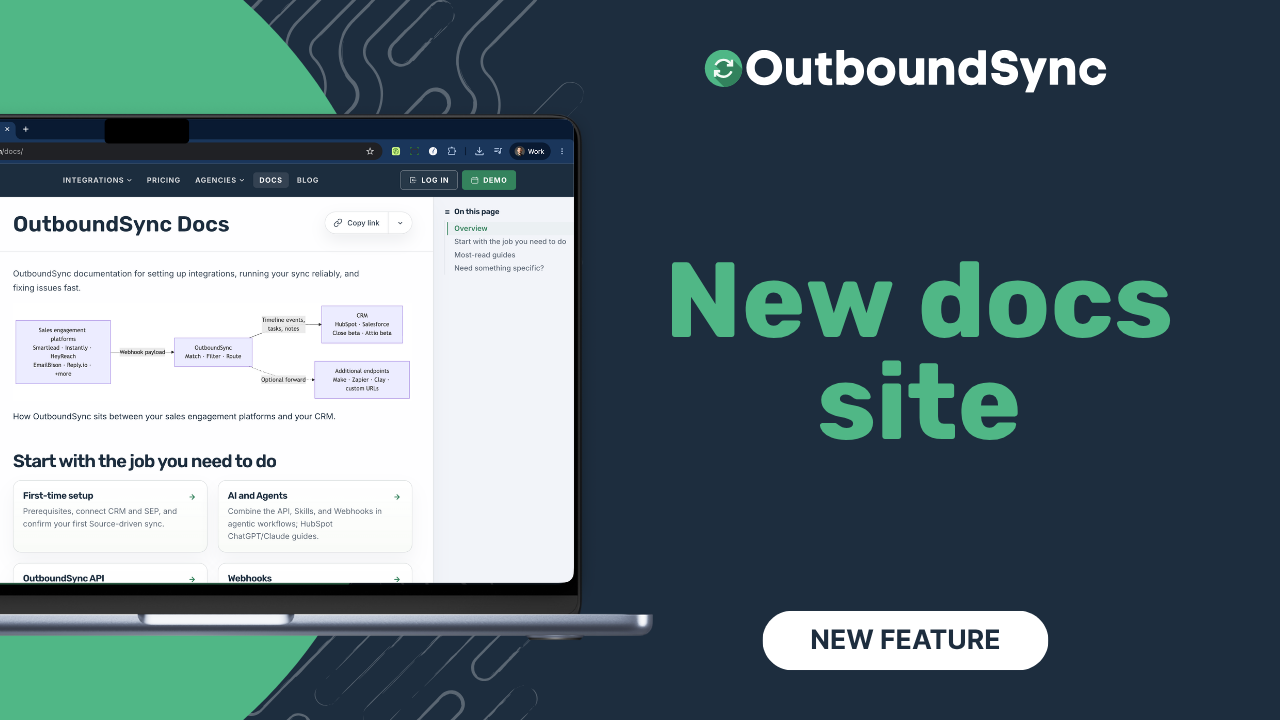
TL;DR. The OutboundSync docs live on outboundsync.com — search with Command-K, copy any article as Markdown, open Ask Claude or Ask Cursor from the page menu, and let agents read the Markdown mirrors. Watch the walkthrough below.
A few months ago we moved the whole site onto outboundsync.com, including what used to be a separate knowledge base. Since then we have been refining articles, filling gaps, and shipping new guides. I never paused to show how the docs surface actually works — so here is a quick tour.
Watch the walkthrough
Finding your way
Open any docs page and you get a left sidebar of the major sections: setup for HubSpot and Salesforce, integration deep-dives, conceptual guides on how the platform works, plus the API, webhooks, and Agent Skills surfaces.
Press Command-K (or Ctrl-K) to search without hunting the index — “how to set up HubSpot” or “Salesforce with OutboundSync” are the kinds of queries that land you on the right article. Each article also has a table of contents on the right so you can jump within a long page.
Share and Markdown for agents
At the top of every article is a small page-actions control that is easy to miss.
Copy the link when you want to drop an article into Slack, a ticket, or another tool. Open the menu for the rest:
- Download as MD, View as MD, or Copy as MD — grab the full page as Markdown
- Ask ChatGPT, Ask Claude, Ask Grok, or Ask Cursor — open a new tab with a prompt pointed at that page
If you are in Claude Code or Codex, copy the article as Markdown and paste it into the session. Same idea when you want an agent to help with setup or troubleshooting and the one-click Ask buttons are not the path you use.
The whole site is also rendered as Markdown. Point an agent at our docs and it can read the pages without you clicking the UI. The menu is for when you want one specific article in the chat right now.
If you are wiring agents into OutboundSync itself, start with Agent Skills, the API, and the expanded skills update.
What’s in the docs
You will find integration how-tos, conceptual guides on sync and mapping, and the API, webhooks, and skills material next to day-to-day setup. We keep adding and revising articles as the product grows.
Frequently asked questions
Where do I find the OutboundSync docs?
The knowledge base lives on the main site at /docs/. There is no separate help-center domain anymore.
How do I search the docs quickly?
Use the left sidebar to browse categories, or press Command-K (Ctrl-K on Windows) to jump straight to setup guides and other articles.
How do I use a docs article with Claude, Cursor, or Codex?
Open the page-actions menu at the top of any article. You can download, view, or copy the page as Markdown, or use Ask ChatGPT, Ask Claude, Ask Grok, or Ask Cursor. For Claude Code or Codex, copy as Markdown and paste it into your session. Every public page also has a Markdown mirror agents can fetch without the UI.
How do I get human help if I am stuck?
Email the OutboundSync team, or use your shared Slack channel if your account has one. You can also book a demo.
Transcript
0:00 Hey there, my name is Harris Kenny, I’m the founder of OutboundSync, and I wanted to take a minute to reintroduce you to our docs, because we migrated our entire website a few months ago, and we’ve been gradually refining, polishing, and updating our docs, and adding a whole bunch of new articles, and
0:18 I just kind of want to show you how the new docs site works, because I realize I never took a minute to explain that.
0:24 So, I’m just on OutboundSync.com. Before we had a dedicated, separate website for our knowledge base, and now it’s all on our main site.
0:32 The first thing you’re going to see is that there’s this left sidebar. You can very quickly search — if you do Command-K on your keyboard, you can search for things like how to set up HubSpot, or how to set up Salesforce with OutboundSync. You can search and go into this little index here on the left
0:49 side of the page, and let me move this out of the way. And here you can look through the broad categories and see what’s available.
0:57 Our new API, new webhooks and skills, which are all in beta. You can also see drilled-down content about some of our most popular integrations and how they work.
1:09 Broader conceptual pieces that exist explain the fundamentals of the platform and the major features. All of this stuff can be found in our docs.
1:18 Quick little table of contents on the right for each article. But one thing I’d wanted to call out in particular, because if you don’t look closely, you might miss it.
1:28 At the top of every article, we have this little widget. You can copy the link and share it with someone on your team or send it to yourself in some other tool or drop into project management or something like that.
1:40 But you can also click this dropdown. And this dropdown is going to make every single page and article in our docs very easy to work with.
1:49 You can download the entire page as a Markdown file. You can view it as a Markdown file. You can copy it as a Markdown file.
1:56 So if you’re running into any challenges with OutboundSync or you want help setting it up with an agent, and if you’re using AI in Claude or Cursor or Codex, you can copy this article and drop it in there really easily.
2:07 You can also just jump right into a chat session by clicking one of these little prompt buttons and it’ll just open it up in a new tab for you, which is great.
2:15 And this entire site, every page is also rendered in Markdown. So if you just have your agent go through our docs, it’s going to have an easy time looking through and seeing what’s going on, regardless of whether or not you take any of these steps.
2:30 But if you find yourself in any of these specific areas, running into any friction or just wanting your agent to do the work for you, we have tried to make this entire thing really discoverable — this entire surface area, the topography of it, the details, the nuances, everything
2:44 just really easy for agents to understand. So, I’m really proud of this docs site. It has expanded dramatically since we’ve moved over to this new self-hosted approach and we’ve published tons and tons of articles literally every single day.
2:59 We’re updating either past articles or adding new ones and I’m really, really proud of it. So, this is the OutboundSync docs or knowledge base or help center.
3:08 Check it out. And of course, you can always just contact our team. We provide products and provide human support, human service.
3:15 You know, email our team and some customers have Slack connect channels with us. You can also ping us in Slack and we’re happy to help you there.
3:21 But yeah, just a quick intro. Check it out. Keep an eye on a lot more stuff that’s going to be published here.
3:26 It’s something that we really want to make easy for you. So thanks for checking it out and have a good one.
3:32 See you in the next one.
Get started
- Browse the docs
- Agent Skills · API overview · Webhooks
- Book a demo if you want a walkthrough against your own stack

Founder & President, OutboundSync
15+ years in B2B sales and operations. Former HubSpot Solutions Partner and Smartlead expert. Built the agency that became OutboundSync.
Similar posts
Use Smartlead Manual Step events in your CRM
OutboundSync now supports Smartlead's Manual Step Reached event. When a prospect reaches a manual step in a campaign, OutboundSync writes it to your CRM.
Harris Kenny
OutboundSync MCP 0.4.0 and Agent Skills update
OutboundSync MCP 0.4.0 labels which tools change data and returns clearer errors. Agent Skills now share one status layout and match the live API and MCP.
Harris Kenny
OutboundSync webhooks are live
OutboundSync now POSTs sync.failed and sync.recovered to your HTTPS endpoint — Slack, PagerDuty, n8n, Zapier, Clay — so you know when CRM sync breaks.
Harris Kenny