Case study: Workflows.io found the outbound HubSpot was missing
Workflows.io is an AI-first growth studio. Four lines of work — social content, automated outbound, AI RevOps, and ABM — billed on outcomes, not hours. Outbound is about a quarter of it. They usually come in on RevOps or ABM, then run outbound on a CRM that’s already been cleaned up. That only works if HubSpot actually has what happened.
Who’s behind it: Dan Rosenthal and Fivos Aresti

Dan RosenthalCo-founder

Fivos ArestiCo-founder
Dan Rosenthal came up through London sales and marketing automation, including time at Apple. Fivos Aresti founded a hospitality business, then did an entrepreneurship master’s at Esade. Between them they have worked with 200+ companies and tested 250+ AI sales tools. Dan has 40k+ followers and 12M+ organic impressions on social; Fivos has 30k+ and 10M+. The studio is a Clay Advanced Artisan Partner and an OutboundSync agency partner.
Their public roster includes GTM teams at Freckle, Landbase, Medrio, and Huzzle. Freckle founder Nathan Merzvinskis on the working relationship:
It feels less like working with an agency and more like having an additional co-founder in the business.
When a client wants Instantly and HeyReach activity in HubSpot, Dan and Fivos will not DIY-write the CRM. Notes and custom events are not an activity log, and bigger clients have sysadmins who notice. They connect those clients to OutboundSync instead.
The challenge: a half-built CRM write looks fine until it doesn’t
Most outbound teams start with the obvious shortcuts. Log a HubSpot note when someone replies. Fire a custom event. Look up the contact, create it, move on.
Dan has tried that path. Notes have no property structure, and they are supposed to be notes. Custom events are self-serve, which is why teams reach for them, then the edges show up: you cannot change the data model, reorder the fields, or stamp a prior date. Timeline order gets weird. You still do not have the send history. Add social — connection sent, connection accepted, post liked — and you are maintaining a warehouse of one-off API calls.
That is survivable with a small client. It is not survivable when a sysadmin starts asking why duplicates showed up, why a field flipped, or why current customers are in a sequence.
Workflows.io has its own outbound analytics app, like a lot of agencies. Dan is specifically not writing that into client HubSpot. The security risk is the point. OutboundSync is SOC 2 Type II, and when a client wants CRM integration, Workflows.io puts them on that connection directly. They do not white-label it.
There's no point in a half-assed CRM integration where when a reply comes we do some lookups and create it. You want the whole activity log. You want the properties. You want to build workflows off the data.
Dan RosenthalCo-founder, Workflows.ioWhy they use OutboundSync instead of rebuilding it
OutboundSync sits between the sending tools and HubSpot, with its own event store — so you can hold activity and put it on the timeline later, dated when it actually happened.
Category-based filters hold noisy traffic — sends, opens, the rest — until a lead hits an allowlisted category, usually a positive reply or another qualified status. Then the full history releases into HubSpot in the order it happened, with original timestamps. DIY custom events cannot do that date math. How to decide which data to sync covers the choice between syncing everything and holding until a lead is qualified.
Serious companies care about this on day one. Instantly plus OutboundSync is still a fraction of a full sales engagement suite. Dan would rather run that pairing than live in a deep, complicated native SEP-to-HubSpot connector.
Of all the SaaS bills on my plate that I would love to vibe-code and replace, OutboundSync is pretty low on that list. It's just not high ROI.
Dan RosenthalCo-founder, Workflows.ioWhat actually lands in HubSpot
Instantly and HeyReach send webhooks to OutboundSync. OutboundSync matches the person, writes HubSpot app timeline events, and updates contact properties the client’s team can use in workflows, lists, and reports. Depending on the platform, that is on the order of 20–30 custom properties — campaign, last reply, lead category, and the rest of the HubSpot property set.
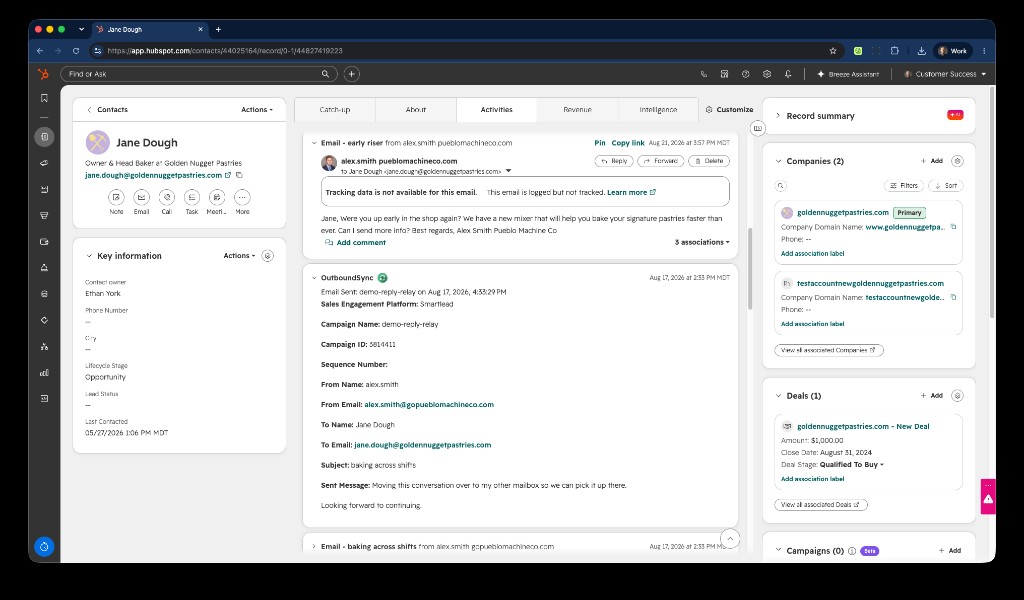
Campaign, sender, recipient, and the message sit on the contact, dated when it happened. That is the activity log. Notes and custom events are not.
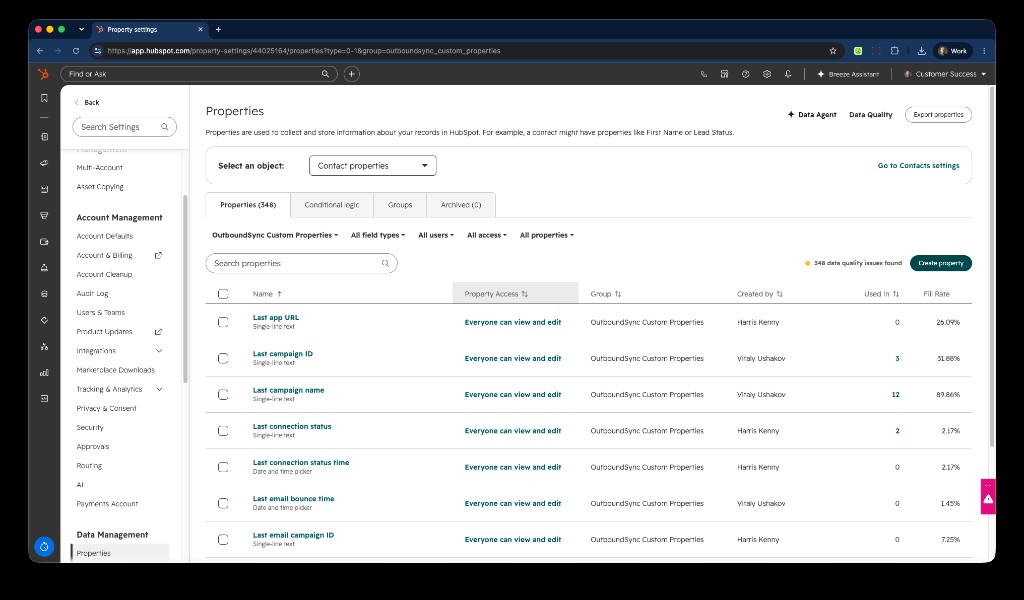
Those fields are why the timeline is usable. Last campaign name, last connection status, bounce time — properties you can filter a list on, enroll a workflow with, or group a last-event report around.
| Approach | What you get | Where it breaks |
|---|---|---|
| HubSpot notes | A blob on the record | No properties, no workflows, notes are for notes |
| HubSpot custom events | A self-serve timeline object | Frozen data model, no field order, no prior date, no backfill |
| OutboundSync | Timestamped app events plus contact properties | You still have to connect the webhook. After that, HubSpot is the system of record |
$1M closed-won ARR, and the Freckle signups that never replied
The $1M ARR and Freckle silent-conversion split are from Dan Rosenthal. Freckle growth and signup totals are also published on Workflows.io’s Freckle case study.
One legal-tech client closed $1M ARR from leads Workflows.io generated. That number lives in HubSpot because the activity does. OutboundSync is what let them prove it — and what let them keep high-volume outbound from reaching people who were already customers.
For a firm selling to lawyers, people show up with a Gmail in one database and a company domain in another, and the company itself may have more than one name. Workflows.io does the CRM cleanup first. OutboundSync syncs activity back onto the cleaned records, so the block is real, not a spreadsheet hope.
Once last-event properties exist, native HubSpot reports can group each contact once by the most recent OutboundSync event that month.
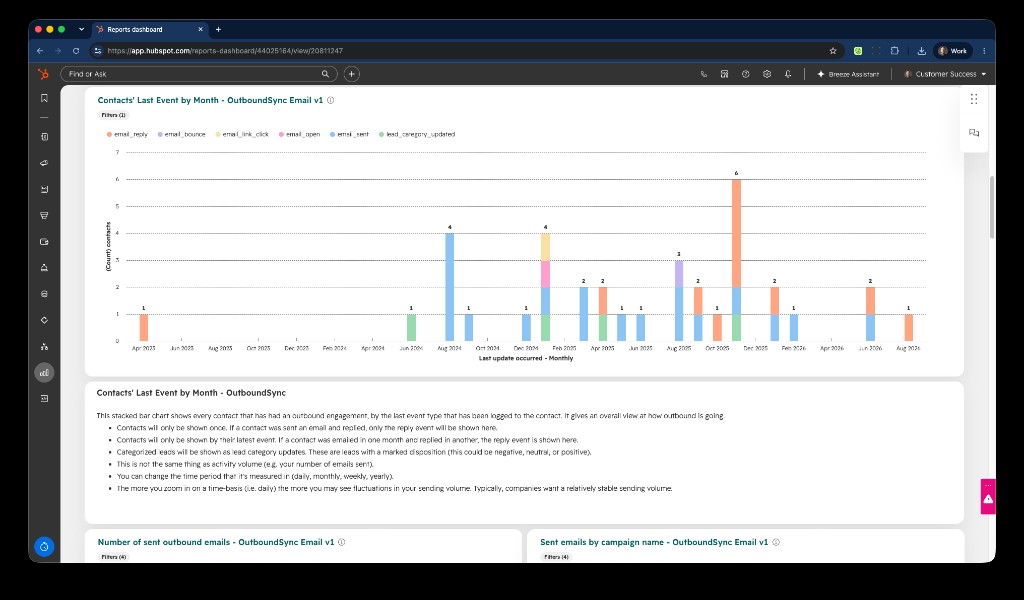
Each bar is the latest event on those contacts. It is not how many emails went out, and it is not ARR. A send in one month and a reply in another lands as the reply. Closed-won ARR attribution uses those same records.
Freckle is the named example, and the numbers are public. Workflows.io rebuilt outbound and the content engine together. In the first six months they published 42% month-over-month growth, 640+ outbound signups, and 1M+ content impressions. About half of those signups never replied to the messages. Workflows.io was sending signup links with credits on social. Some people clicked, signed up, and never wrote back. The touch was still outbound. HubSpot only knew that if the activity had been synced.
Without OutboundSync, Dan says they would have cut attributed impact in half. Freckle later took outbound in-house and kept Workflows.io on content — their longest-standing client.
Around half of those signups never responded to the messages. Had we not had OutboundSync, we would have cut our attributed impact on Freckle in half.
Dan RosenthalCo-founder, Workflows.ioThe motion they actually run needs a complete CRM. They post content, send connection requests to the ICP, then reach out after someone engages — or after enough time has passed. Same for TAM mapping, stakeholder mapping, and loading accounts into HubSpot before a sequence starts. If you are investing in content and then outbound off the back of it, you need to track the path.
Dan’s line on bigger companies is blunt: they care about CRM integration from day one, and they are not going to be happy with mishaps. The cost of doing it properly is doable in those deals. The cost of rebuilding OutboundSync inside the agency is not.
If you want the studio itself — four service lines, outcome pricing, the founders — that is the Workflows.io partner spotlight. If you want the same HubSpot loop for your own outbound, get a demo.

Founder & President, OutboundSync
15+ years in B2B sales and operations. Former HubSpot Solutions Partner and Smartlead expert. Built the agency that became OutboundSync.
Similar posts
Case study: Opensend knows outbound is working—without leaving HubSpot
Learn how Opensend integrated their Clay agency's cold email strategy with HubSpot using OutboundSync, leveraging workflows, reports, dashboards, and more.
Harris Kenny