Manual email replies available for Smartlead
OutboundSync now supports Manual Reply Sent events from inside Smartlead into your CRM.
This means that the emails you send from inside of Smartlead’s master inbox are now going to be logged in your CRM.
You can now do things like:
- See full Smartlead threads inside your CRM.
- Track leads who have not been replied to yet.
- Manage your speed to lead inside your CRM.
- Improve omnichannel followup with better visibility.
- Send reply data back to AI for optimization.
…and whatever else you cook up!
All you have to do is enable this new event type in Smartlead:
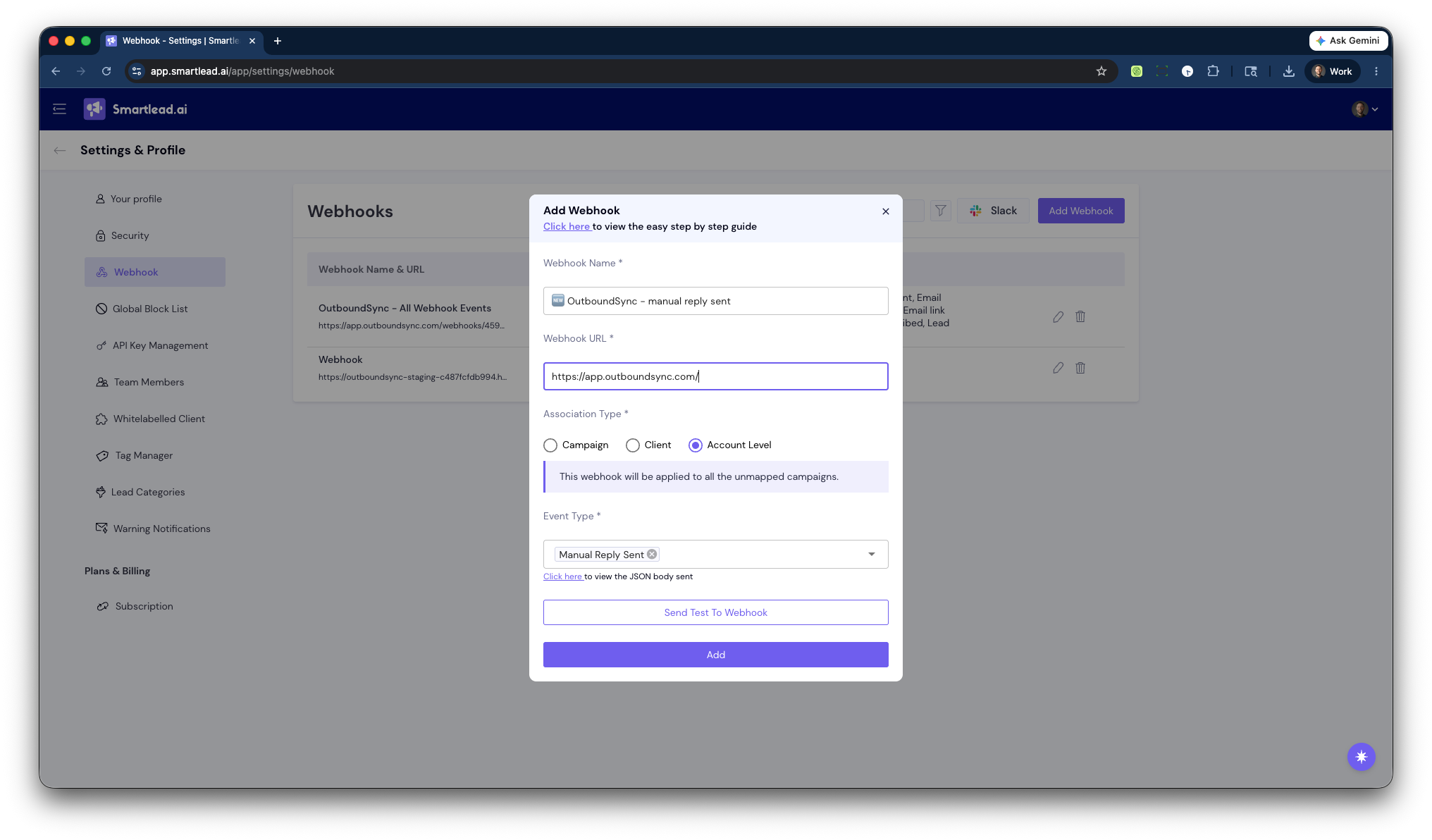
This is a huge and long-awaited feature. Big thanks to the Smartlead team for building this so we can add support for it in OutboundSync.
Available right now
This is live for every OutboundSync customer. Just start sending us data from Smartlead and we’ll log it for you.
If you use category-based filters, normal data routing logic will apply, meaning that the lead must have the appropriate lead category in Smartlead for the data to sync.

Founder & President, OutboundSync
15+ years in B2B sales and operations. Former HubSpot Solutions Partner and Smartlead expert. Built the agency that became OutboundSync.
Similar posts
Use Smartlead Manual Step events in your CRM
OutboundSync now supports Smartlead's Manual Step Reached event. When a prospect reaches a manual step in a campaign, OutboundSync writes it to your CRM.
Harris Kenny
OutboundSync MCP 0.4.0 and Agent Skills update
OutboundSync MCP 0.4.0 labels which tools change data and returns clearer errors. Agent Skills now share one status layout and match the live API and MCP.
Harris Kenny
OutboundSync webhooks are live
OutboundSync now POSTs sync.failed and sync.recovered to your HTTPS endpoint — Slack, PagerDuty, n8n, Zapier, Clay — so you know when CRM sync breaks.
Harris Kenny