
Retry a month of failed HubSpot and Salesforce syncs
A field mapping was wrong for three weeks. You fixed it. History is still full of those HubSpot or Salesforce errors, and retrying them one at a time is the rest of the afternoon.
You could already retry one of those syncs. You can now retry the recorded errors from the last 30 days for that source, once per day.
What you already had
One sync. HubSpot or Salesforce. Status Error.
POST /api/v1/syncs/:id/retry takes a key with the write scope, including a connection-scoped key. There is no daily limit. The response is 201, with queued: true and the original sync id. The retry updates that same row. Success and Warning are left alone.
This is the call to make when you are checking a fix. Read that same id until the status is success before you retry the rest.
What is new
Anyone who can see a HubSpot or Salesforce source can retry its recorded errors from the last 30 days. The control is Retry failed on the source row. No API key.
The same call is POST /api/v1/sources/:sourceId/syncs/retry, and on the hosted MCP server it is retry_source_syncs.
The batch skips warnings. It also skips syncs that never recorded a result. Those still show as error in the list API, and you retry them one at a time with the single-sync route. Close and other CRMs are refused, and that refusal does not start the 24-hour window.
queued: true means the batch was accepted, including when nothing in the window was eligible. The lock lasts 24 hours from that request, and it stays after the batch finishes. A second bulk call inside the window is 409. The body includes retryAvailableAt and retryAfterSeconds, and the message points back at the single-sync route, which keeps working.
A pause, a missing entitlement, or an unsupported CRM is a different 409. That one does not start the window.
A retry updates the original sync. It does not create a second row, and it is not counted as another billable send.
Three ways to run it
Sources. Open Sources and use Retry failed on the HubSpot or Salesforce row. On a wide screen that is the retry icon. The tooltip says Retry failed.
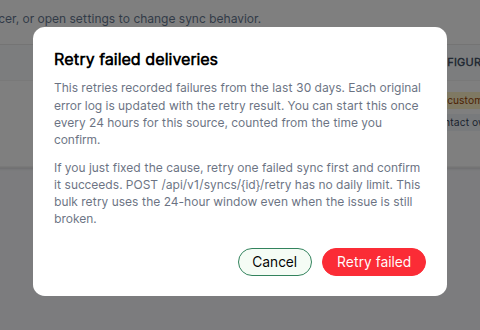
The dialog is titled Retry failed deliveries. It states the 30-day window, the once-every-24-hours limit, and the warning to retry one failed sync first. Confirming spends the window even if the cause is still broken. Press it after one sync has succeeded.
One sync, then the source. Both calls need write. Find an id with GET /api/v1/syncs?status=error or GET /api/v1/sources/10/syncs?status=error.
# Confirm the fix on one recorded error. No daily limit.curl -X POST "https://app.outboundsync.com/api/v1/syncs/4401/retry" \  -H "Authorization: Bearer $OUTBOUNDSYNC_API_KEY"
# After that sync succeeds, retry the rest of the source.# Once per source per 24 hours.curl -X POST "https://app.outboundsync.com/api/v1/sources/10/syncs/retry" \  -H "Authorization: Bearer $OUTBOUNDSYNC_API_KEY"
The API reference has both response bodies, including the two different 409s. The button, the eligibility rules, and the support path are in How to reprocess errored webhook logs.
If an agent is doing the work
Claude Code, Cursor, and Codex can call the hosted MCP server at https://mcp.outboundsync.com/mcp with the same Bearer key. That server already includes retry_sync and retry_source_syncs.
Have the agent confirm with you before any write. Then:
list_syncsorlist_source_syncs, and pick one sync that already has a recorded error.retry_syncon that id.get_syncuntil it succeeds.retry_source_syncsfor that source.
If retry_source_syncs returns 409 and the body includes retryAvailableAt, the 24-hour window is already open. retry_sync still has no daily limit.
claude.ai and Claude Desktop remote connectors still expect OAuth and are not supported. A chat-only client with no MCP connection, including Grok in chat, should use Retry failed on Sources. For logs older than 30 days, email support.
What this does not cover
- Warnings. Both retry paths skip them.
- Syncs with no result row. Retry those one at a time.
- CRMs other than HubSpot and Salesforce.
- Events older than 30 days. History → Sync history only shows that window. The button, the bulk API, and
retry_source_syncsstop there.
For the older events, email support@outboundsync.com with the account, CRM, source, date range, and a screenshot of the error. Support escalates to engineering, which can replay retained payloads further back. The same path covers other CRMs and any custom retry.
Frequently asked questions
How often can I bulk retry a source?
Once per source per 24 hours, measured from the request that was accepted. The window stays open after the batch finishes. A second bulk call inside that window returns 409 with retryAvailableAt and retryAfterSeconds. Retrying one sync with POST /api/v1/syncs/:id/retry has no daily limit and still works during the window.
Does bulk retry include warnings? No. Bulk retry re-queues recorded Error rows from the last 30 days for one HubSpot or Salesforce source. Warnings are skipped. Syncs with no result row show as error in the API and are not in the bulk set. Retry those one at a time.
What about errors older than 30 days?
Those stay with support. History, the Sources button, the bulk API, and retry_source_syncs only cover the last 30 days. Email support@outboundsync.com with the account, CRM, source, date range, and a screenshot of the error. Support escalates to engineering, which can replay retained payloads further back.
Do I need an API key for the button? No. Anyone who can see a HubSpot or Salesforce source can use Retry failed on Sources. The API and MCP routes need a key with the write scope. Connection-scoped keys can call both retry routes.
Will a retry create a second activity or a second billable send?
No. A successful retry updates the original sync row. It does not create a second row, and it is not counted as another billable send. queued: true means the retry was accepted, not that the CRM write has already finished.

Founder & President, OutboundSync
15+ years in B2B sales and operations. Former HubSpot Solutions Partner and Smartlead expert. Built the agency that became OutboundSync.
Similar posts
Introducing the OutboundSync CLI
Check sync health, retry failed syncs, and manage webhooks from your terminal. The OutboundSync CLI is on npm, prints JSON, and is built for scripts and agents.
Harris Kenny

Skip free email domains in your CRM
OutboundSync can now skip Gmail, Yahoo, AOL, and 4,700+ other free email domains when it matches or creates companies in HubSpot, Salesforce, Close, and Attio.
Harris Kenny

Use Smartlead Manual Step events in your CRM
OutboundSync now supports Smartlead's Manual Step Reached event. When a prospect reaches a manual step in a campaign, OutboundSync writes it to your CRM.
Harris Kenny